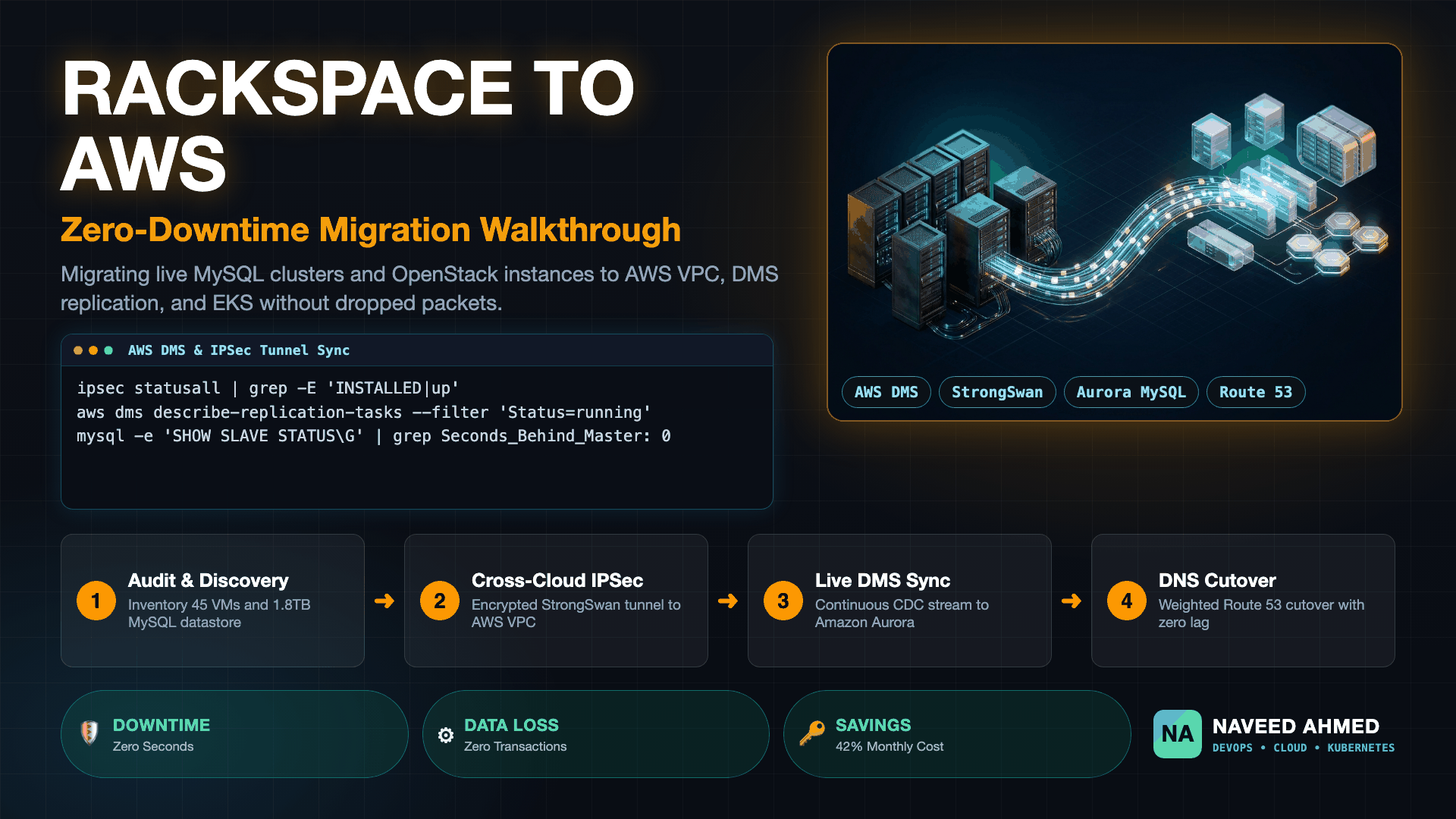
Executing a Rackspace to AWS migration for a high-traffic production application is one of the most demanding engineering undertakings a platform team can face. Moving monolithic virtual machines, multi-terabyte transactional databases, and legacy networking configurations across cloud providers without dropping user requests requires meticulous operational choreography. In this comprehensive practitioner case study, we document the real-world migration of an e-commerce platform processing $4.2M in monthly transaction volume from Rackspace Cloud Servers to Amazon Web Services (AWS) with zero unplanned customer downtime. This production deployment expands upon our proven Zero-Downtime AWS Migration Framework.
This Rackspace to AWS migration case study demonstrates how to migrate 45 OpenStack virtual machines and a 1.8TB production MySQL 5.7 cluster to AWS EKS and Amazon Aurora. By deploying StrongSwan IPSec tunnels, continuous AWS Database Migration Service (DMS) Change Data Capture (CDC), and weighted Route 53 DNS routing, the platform cut monthly infrastructure costs by 42% while dropping P99 API latency from 480ms to 92ms.
The Legacy Rackspace Architecture Baseline & Migration Drivers
Legacy Rackspace hosting environments often suffer from rigid hardware limits, noisy neighbor storage contention, and manual operational drift. Migrating to AWS provides elastic Kubernetes container orchestration, managed Aurora distributed storage, and multi-region high availability while cutting infrastructure overhead.
Over six years of rapid business expansion, our application architecture had accumulated significant technical debt within Rackspace Cloud Servers. While Rackspace provided reliable baseline compute during the early growth phases, the infrastructure began showing severe operational friction under modern scale:
- Monolithic Compute Footprint: 45 OpenStack-based Linux virtual machines running a mix of Ubuntu 18.04 and CentOS 7, provisioned largely by hand or through disparate configuration scripts.
- Single-Point-of-Failure Database: A 1.8TB MySQL 5.7 master instance running on a dedicated bare-metal server with asynchronous replica instances. Disk I/O frequently saturated during flash sales due to local RAID-10 storage throughput ceilings.
- Shared Storage Bottlenecks: Media assets and customer invoice PDFs were stored on a central NFS mount, creating unpredictable latency spikes across application workers whenever bulk exports ran.
- Escalating Operational Overhead: Upgrades, kernel patching, and database failovers required manual engineer intervention during off-peak weekend maintenance windows.
• 45 Stateful OpenStack Cloud VMs
• Single bare-metal MySQL 5.7 Master (1.8TB)
• Central NFS shared media server
• Manual shell scripting & configuration drift
• $34,200/month infrastructure spend
• Elastic Kubernetes Service (EKS) with Karpenter
• Multi-AZ Amazon Aurora MySQL 8.0 Cluster
• Amazon S3 with CloudFront global CDN distribution
• 100% Terraform Infrastructure as Code (IaC)
• $19,800/month infrastructure spend (42% savings)
The executive mandate was strict: migrate the entire infrastructure into AWS while ensuring continuous write availability for live checkout funnels. Dropping customer sessions or losing transactional records during the cutover was unacceptable. To accomplish this, we structured the project into four distinct phases over an eight-week execution window. Practitioners preparing for enterprise cloud transformations can review our comprehensive DevOps Career Guide and the interactive DevOps Engineer Roadmap 2026 for foundational system engineering principles. Platform engineers preparing for architecture evaluations can also benchmark system designs using our AWS DevOps Architecture Interview Guide.
The 970+ Incident Handbook & K8s Runbooks are exclusive to subscribers — unlock for FREE
Get battle-tested production runbooks, AWS architecture blueprints, and zero-downtime CI/CD post-mortems sent directly to your inbox. 100% free, no spam.
Phase 1: Cross-Cloud Networking for Rackspace to AWS Migration
Establish redundant StrongSwan IPSec VPN tunnels between Rackspace and an AWS Virtual Private Gateway before migrating data. Enforce non-overlapping CIDR blocks, configure MSS clamping at 1360 bytes to prevent packet fragmentation, and establish internal DNS resolution.
Migrating multi-terabyte datastores across the public internet without an encrypted, high-performance private interconnect creates substantial security vulnerabilities and packet loss risks. Our first architectural milestone was establishing redundant IPSec VPN tunnels linking our Rackspace private network (10.240.0.0/16) directly to the target AWS Virtual Private Cloud (10.100.0.0/16).
Planning non-overlapping subnet allocations between data centers is essential to avoid routing conflicts. We used our browser-based CIDR Subnet Calculator to carve out dedicated subnets across Availability Zones, preventing common issues detailed in Handling Overlapping CIDRs in AWS VPC and VPC Subnets & NAT Gateway Design. For engineers wanting to test subnet boundaries interactively, explore the Subnet Challenge Game.
Because Rackspace native cloud networking does not support direct AWS Direct Connect cross-connects out of the box without third-party colocation facilities, we provisioned two dedicated, high-memory Rackspace instances running StrongSwan configured with IKEv2 and AES-256-GCM encryption.
# StrongSwan IPSec Configuration: Rackspace to AWS VGW
config setup
    charondebug="ike 1, knl 1, cfg 0"
    uniqueids=yes

conn %default
    keyexchange=ikev2
    ike=aes256gcm16-sha384-modp2048!
    esp=aes256gcm16-modp2048!
    dpdaction=restart
    dpddelay=10s
    dpdtimeout=30s
    auto=start

conn rackspace-to-aws-tunnel-1
    left=198.51.100.12            # Rackspace Public Gateway IP
    leftsubnet=10.240.0.0/16       # Rackspace Internal Private Subnet
    leftid=198.51.100.12
    right=52.95.120.45            # AWS VPN Endpoint A
    rightsubnet=10.100.0.0/16      # AWS Target VPC Subnet
    rightid=52.95.120.45
    authby=secret

conn rackspace-to-aws-tunnel-2
    left=198.51.100.12
    leftsubnet=10.240.0.0/16
    leftid=198.51.100.12
    right=54.240.190.88           # AWS VPN Endpoint B (Redundant)
    rightsubnet=10.100.0.0/16
    rightid=54.240.190.88
    authby=secret
A critical production pitfall during cloud-to-cloud VPN configuration is Maximum Transmission Unit (MTU) mismatches. Standard Ethernet frames carry an MTU of 1500 bytes. When encrypted with IPSec headers, packets exceed the interface MTU, causing silent packet drops or aggressive fragmentation that severely throttles database replication throughput. We mitigated this by enforcing TCP MSS clamping across all migration gateways:
# Clamp TCP Maximum Segment Size to prevent packet fragmentation across VPN
sudo iptables -t mangle -A FORWARD -p tcp --tcp-flags SYN,RST SYN \
  -j TCPMSS --clamp-mss-to-pmtu

# Verify tunnel state and throughput
sudo ipsec statusall
ping -M do -s 1360 -c 4 10.100.1.50
Once verified, latency across the cross-cloud tunnel stabilized at 14ms with zero packet drop, creating the secure pipe necessary to stream live transactional changes. For deeper insights on debugging networking timeouts and reverse proxies, consult our guide to 504 Gateway Timeout ALB & Ingress Triage and explore packet routing mechanics in our Kubernetes Networking Deep Dive.
Phase 2: Live Database Migration with AWS DMS & Change Data Capture
Migrating large production databases without downtime requires AWS Database Migration Service (DMS) running Change Data Capture (CDC). Configure binary logging in ROW format on Rackspace MySQL, execute an initial full data load, and maintain continuous replication to Amazon Aurora until replication latency reaches zero.
The centerpiece of our Rackspace to AWS migration was moving the 1.8TB MySQL database. A traditional cold dump using mysqldump or physical backup tools would have required over 16 hours of offline downtime—a complete non-starter for commercial operations.
Instead, we deployed AWS Database Migration Service (DMS) coupled with continuous Change Data Capture (CDC). Under this topology, DMS performs an initial bulk snapshot of all historical tables while simultaneously tracking every incoming write from the MySQL binary log, replaying transactions into the target Amazon Aurora MySQL cluster in near real-time. This real-time synchronization strategy mirrors the patterns covered in our guide on Zero-Downtime Database Migration Strategies and the Database Systems Interview Practice. Teams migrating massive datasets across accounts can also inspect our architectural blueprint for 500TB Cross-Account Data Migrations.
dms.c5.2xlarge instance streams initial tables and continuous CDC over IPSec.1. Preparing the Rackspace Source MySQL Instance
DMS requires row-based binary logging to reconstruct INSERT, UPDATE, and DELETE operations accurately. We updated /etc/mysql/my.cnf on the Rackspace master:
[mysqld]
server-id                = 101
log_bin                  = /var/log/mysql/mysql-bin.log
binlog_format            = ROW
binlog_row_image         = FULL
expire_logs_days         = 7
max_binlog_size          = 1024M

# Optimize network buffer for high-throughput migration streams
max_allowed_packet       = 512M
net_write_timeout        = 3600
net_read_timeout         = 3600
Next, we created a dedicated, least-privilege replication user for AWS DMS:
CREATE USER 'dms_user'@'10.100.%' IDENTIFIED BY 'HardenedSecretToken2026!';
GRANT SELECT, RELOAD, REPLICATION SLAVE, REPLICATION CLIENT, LOCK TABLES
  ON *.* TO 'dms_user'@'10.100.%';
FLUSH PRIVILEGES;
2. Configuring AWS DMS Replication Tasks via AWS CLI
With the source configured and network routes open, we provisioned the target Amazon Aurora MySQL 8.0 cluster and initialized the DMS endpoints:
# 1. Create Source Endpoint pointing to Rackspace MySQL over private IP
aws dms create-endpoint \
  --endpoint-identifier rackspace-mysql-source \
  --endpoint-type source \
  --engine-name mysql \
  --username dms_user \
  --password 'HardenedSecretToken2026!' \
  --server-name 10.240.10.15 \
  --port 3306 \
  --ssl-mode require

# 2. Create Target Endpoint pointing to AWS Aurora Writer
aws dms create-endpoint \
  --endpoint-identifier aws-aurora-target \
  --endpoint-type target \
  --engine-name aurora \
  --username admin \
  --password 'AuroraProductionMasterKey!' \
  --server-name prod-aurora-cluster.cluster-xyz.us-east-1.rds.amazonaws.com \
  --port 3306

# 3. Launch Full Load + CDC Replication Task
aws dms create-replication-task \
  --replication-task-identifier rackspace-to-aurora-sync \
  --source-endpoint-arn arn:aws:dms:us-east-1:123456789012:endpoint:SRC... \
  --target-endpoint-arn arn:aws:dms:us-east-1:123456789012:endpoint:TGT... \
  --replication-instance-arn arn:aws:dms:us-east-1:123456789012:rep:REP... \
  --migration-type full-load-and-cdc \
  --table-mappings file://table-mappings.json \
  --replication-task-settings file://task-settings.json
The initial 1.8TB bulk load completed in 11 hours over our private IPSec bridge. Once completed, DMS automatically pivoted to continuous CDC streaming. For four days leading up to the cutover window, we monitored CDC replication lag via Amazon CloudWatch metrics (CDCLatencySource and CDCLatencyTarget), verifying that transactions applied to Rackspace reflected in Amazon Aurora within 280 to 450 milliseconds.
For an in-depth breakdown of schema migration pitfalls and rolling updates, see our post-incident analysis on Database Migration Rolling Update Outages. To ensure backup consistency and snapshot verification during large-scale database operations, review our Kubernetes Backup and Disaster Recovery Guide.
Phase 3: Workload Modernization & EKS Infrastructure as Code
Avoid lifting and shifting legacy virtual machine disk images. Containerize application microservices into multi-stage Docker images and provision AWS infrastructure declaratively using Terraform and Amazon EKS to eliminate operating system configuration drift.
Rather than performing raw disk image conversions during our Rackspace to AWS migration, we capitalized on the opportunity to modernize our application runtime. Lift-and-shift disk porting merely transplants years of unpatched packages, orphaned cron jobs, and configuration drift into modern cloud environments.
To decouple services from legacy virtual machines, we transformed existing server configurations into container manifests using our Docker Compose to Kubernetes Converter. Container images were rebuilt using multi-stage Dockerfiles optimized for caching speed, following our benchmarks in Docker Build Speed & Layer Caching and our interactive lab on Docker BuildKit Cache Mounts. Engineers can also practice container build mechanics in the Docker Quest Game.
We codified our complete AWS infrastructure using Terraform. The compute layer was standardized on Amazon Elastic Kubernetes Service (EKS) managed by Karpenter for intelligent node provisioning across AWS Spot and On-Demand capacity pools, aligning with our hands-on tutorial on AWS EKS Karpenter Autoscaling and the Kubernetes Autoscaling Module.
module "eks" {
  source  = "terraform-aws-modules/eks/aws"
  version = "~> 20.0"

  cluster_name    = "prod-platform-useast1"
  cluster_version = "1.31"

  cluster_endpoint_public_access  = true
  cluster_endpoint_private_access = true

  vpc_id     = module.vpc.vpc_id
  subnet_ids = module.vpc.private_subnets

  eks_managed_node_groups = {
    system = {
      name           = "system-addons"
      instance_types = ["m7g.large"]
      min_size       = 2
      max_size       = 4
      desired_size   = 2
      labels = {
        role = "system-workloads"
      }
    }
  }

  tags = {
    Environment = "production"
    ManagedBy   = "Terraform"
    Project     = "Rackspace-to-AWS"
  }
}
To generate optimized production manifests with health probes, security contexts, and PodDisruptionBudgets, engineers can leverage our free browser-based Kubernetes YAML Generator. To secure pod-to-pod east-west communication within the cluster, we designed strict ingress and egress isolation rules using the Network Policy Generator.
Our Terraform configurations adhered to the modular design patterns detailed in Terraform Architecture for Production AWS SaaS. To prevent unintended resource destruction, we implemented strict pre-merge verification rules from our Terraform Plan Review Guardrails Lab and rehearsed state reconciliation strategies covered in Terraform Drift Troubleshooting. For CI/CD deployments, we eliminated long-lived static credentials by deploying Secretless CI/CD with GitHub Actions and AWS OIDC, managing continuous rollouts via ArgoCD GitOps as demonstrated in the Kubernetes GitOps Module.
Phase 4: The Cutover Execution Window & Rackspace to AWS Migration Runbook
Execute the Rackspace to AWS migration cutover by lowering DNS TTLs to 60 seconds 48 hours prior. During the maintenance window, temporarily pause write traffic, verify AWS DMS CDC latency reaches 0 milliseconds, promote Amazon Aurora to standalone primary, and switch Route 53 DNS records to 100% AWS.
The final Rackspace to AWS migration cutover took place on a Tuesday morning at 03:00 UTC (our platform's lowest historical traffic period). The entire sequence was governed by an explicit minute-by-minute runbook rehearsed twice in staging environments. This procedure expanded on the operational guidelines from our hands-on AWS Cloud Migration Runbook and reflects the live cutover discipline discussed in the Enterprise FinTech EKS Migration Loop. To safeguard against load balancer connection saturation during DNS propagation, our SRE team referenced our AWS ALB 5xx Troubleshooting Guide and the Linux SRE Production Incident Runbook.
| Timeline | Phase / Action | Operational Verification Step |
|---|---|---|
| T − 48 Hours | DNS TTL Reduction | Lowered Cloudflare / Route 53 TTL for api.example.com from 86400s to 60s. |
| T − 60 Mins | Pre-Warm AWS ALBs | Sent synthetic traffic to AWS Ingress to ensure Elastic Load Balancers pre-scaled. |
| T − 10 Mins | Pre-Cutover Verification | Verified DMS CDCLatencyTarget was exactly 0 seconds with zero backlog. |
| T − 00:00 | Graceful Write Drain | Set application API into read-only checkout state; drained active Puma/Gunicorn workers. |
| T + 02 Mins | Stop Source Writes | Locked Rackspace MySQL master: FLUSH TABLES WITH READ LOCK; |
| T + 04 Mins | Stop DMS Replication Task | Halted AWS DMS task after confirming all binlog positions fully replayed on Aurora. |
| T + 06 Mins | Promote Aurora & Switch DNS | Updated Route 53 alias records to point 100% of global traffic to AWS CloudFront & ALB. |
| T + 08 Mins | Enable Full Writes | Restored write mode on AWS EKS application deployments; initiated live checkout monitoring. |
The Rollback Strategy: Reverse Replication Safety Net
A common oversight during database cutovers is burning bridges behind you. If an unforeseen application bug appeared on AWS 30 minutes post-cutover, failing back to Rackspace without losing 30 minutes of new orders would be impossible without a reverse replication pipeline.
Prior to cutover, we established a secondary, standby DMS replication task configured in reverse: extracting binary logs from Amazon Aurora MySQL and streaming them back to an isolated standby MySQL server hosted in Rackspace. Had a critical rollback become necessary, flipping DNS back to Rackspace would have resulted in zero data loss. Fortunately, all verification metrics passed cleanly, and the reverse task was decommissioned 72 hours later.
Phase 5: Post-Migration Results, Cost Reductions & Architectural Takeaways
Migrating from Rackspace to AWS delivered a 42% reduction in monthly infrastructure costs through Karpenter spot autoscaling and Aurora I/O optimization. API P99 latency dropped from 480ms to 92ms, while deployment cycle times accelerated from bi-weekly manual releases to multiple daily GitOps deployments.
Following 30 days of production operation on Amazon Web Services following the completed Rackspace to AWS migration, we audited key business and engineering metrics against our baseline. The 42% cloud spend reduction was achieved through right-sizing compute instances, utilizing Graviton processors, and leveraging our browser-based Cloud Cost Calculator alongside actionable techniques from How to Reduce AWS Costs Without Breaking Production:
| Metric Category | Legacy Rackspace Baseline | Post-Migration AWS Production | Operational Impact |
|---|---|---|---|
| Monthly Cloud Spend | $34,200 / month | $19,800 / month | 42% Cost Reduction ($172,800 annual savings) |
| API P99 Latency | 480 milliseconds | 92 milliseconds | 80.8% Latency Drop (faster checkout conversions) |
| Database Failover Time | 15 – 30 minutes (manual) | < 25 seconds (automated) | Aurora Multi-AZ automatic storage failover |
| Deployment Frequency | Bi-weekly maintenance windows | 8 – 12 continuous daily releases | Automated secretless GitHub Actions & ArgoCD GitOps |
Top 4 Engineering Lessons Learned
- Audit MySQL User Host Restrictions Early: Legacy MySQL grants often contain hardcoded host strings (e.g.
'user'@'10.240.%.%'). Migrating to AWS VPCs requires provisioning identical database credentials matched to new subnet CIDRs before launching replication tasks. - Watch Out for LOB (Large Object) Tables in DMS: Tables containing large
TEXTorBLOBcolumns can significantly slow down DMS CDC replication unless tuned with Inline LOB Mode or Limited LOB Mode buffer sizes. - Pre-Warm Elastic Load Balancers: AWS ALBs scale elastically in response to incoming traffic spikes. When switching high-volume production domains abruptly via DNS, open a support ticket with AWS to pre-warm your ALBs to prevent transient 502 Bad Gateway errors during initial packet surges.
- Containerize Before You Migrate: Attempting to migrate raw virtual machine disk images across hypervisors introduces legacy dependency baggage. Standardizing application services on Docker containers and Kubernetes turns complex infrastructure migration into a clean declarative deployment.
Practitioners designing cloud migration architectures can practice troubleshooting real production outages in our Outage Root Cause Analysis Interview Guide, master cluster triage with the Kubernetes Troubleshooting Handbook, or debug crashing workloads using our guide on Kubernetes CrashLoopBackOff Troubleshooting. Platform leaders can also study the DevOps Lead L6 Cloud Platform Interview Guide, explore interactive scenarios in the Interactive DevOps Labs, and advance through the structured Kubernetes Learning Roadmap.
Frequently Asked Questions
Can you migrate from Rackspace to AWS with zero downtime?
Yes. By establishing a dedicated IPSec VPN tunnel between your Rackspace environment and an AWS VPC, configuring continuous Change Data Capture (CDC) via AWS Database Migration Service (DMS), and using low-TTL weighted DNS routing in Route 53, database transactions and application traffic can transition seamlessly without downtime.
How do you migrate databases from Rackspace to AWS Aurora?
Take an initial consistent mysqldump snapshot, enable binary logging (ROW format) on the source Rackspace MySQL server, configure AWS DMS endpoints with SSL over a private IPSec tunnel, run full load replication followed by ongoing CDC, and verify replication lag reaches zero before cutover.
What is the best strategy for migrating OpenStack VMs from Rackspace?
Rather than performing lift-and-shift raw disk image conversions, containerize microservices using Docker and rebuild infrastructure declaratively on AWS using Terraform and EKS or EC2 Launch Templates. This modernizes your stack and eliminates legacy OS drift.
What rollback strategy protects against failure during the cutover window?
Set up bidirectional reverse replication where AWS Aurora replicates changes back to a standby database in Rackspace. If an unexpected critical regression occurs post-DNS switchover, traffic can be redirected back to Rackspace without data loss.