Rewriting every application manifest from a standard Kubernetes Deployment to a vendor-specific CRD slows down platform migrations. Flagger Kubernetes (fluxcd/flagger) takes the opposite approach: you keep your existing Deployment, DaemonSet, or StatefulSet manifests untouched, and add a Canary custom resource beside them. Flagger watches for image or config changes, spins up canary pods, shifts traffic incrementally across Kubernetes Gateway API, Istio, Linkerd, or NGINX, and rolls back automatically if Prometheus or Datadog metrics degrade.
If you are evaluating progressive delivery controllers across your cluster, read our Argo Rollouts Canary and Blue-Green guide and our Kubernetes deployment strategies guide. Here, we break down how Flagger works internally, how to configure Canary and MetricTemplate manifests with Gateway API, and how Flagger compares to Argo Rollouts in 2026.
What Is Flagger in Kubernetes?
Flagger is an open-source (Apache 2.0) CNCF progressive delivery operator and part of the Flux GitOps family. It automates Canary releases, A/B testing (via HTTP headers or cookies), and Blue-Green deployments (traffic switching or mirroring) on Kubernetes by controlling service meshes, ingress controllers, or Gateway API HTTPRoute weights while evaluating real-time observability metrics.
When Flagger initializes a Canary, it clones your original Deployment into a <app>-primary Deployment and scales your original Deployment down to zero replicas. Never delete the -primary Deployment by hand; Flagger treats it as the live production workload.
The 970+ Incident Handbook & K8s Runbooks are exclusive to subscribers — unlock for FREE
Get battle-tested production runbooks, AWS architecture blueprints, and zero-downtime CI/CD post-mortems sent directly to your inbox. 100% free, no spam.
How Does Flagger Kubernetes Progressive Delivery Work?
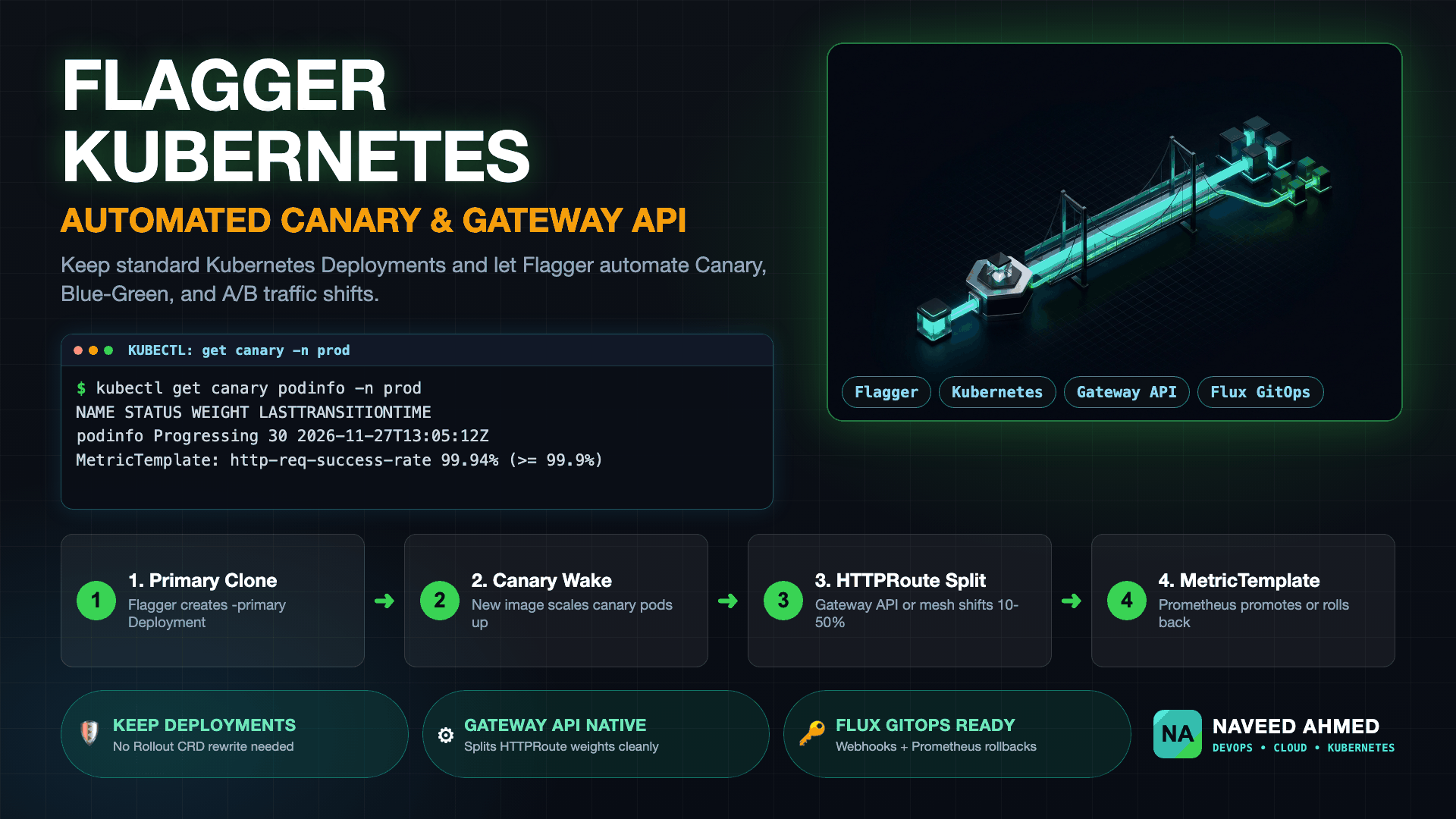
Once a Canary resource reaches the Initialized state, Flagger watches the target Deployment template, ConfigMaps, and Secrets for hash changes. Any update triggers a deterministic four-stage promotion loop:
Flux or CI updates the image tag or ConfigMap on the base Deployment.
Flagger scales the base Deployment up as the live canary beside -primary.
Gateway API or mesh shifts 10% to 50% traffic while Prometheus checks SLOs.
Passing checks update -primary; threshold breaches revert traffic instantly.
Flagger vs Argo Rollouts: Which Progressive Delivery Tool Fits?
Both Flagger Kubernetes and Argo Rollouts solve the same progressive delivery problem, yet they integrate very differently with your GitOps and manifest workflow.
| Feature | Flagger | Argo Rollouts |
|---|---|---|
| GitOps ecosystem | CNCF Flux family (works natively with Flux and Helm) | CNCF Argo Project (tight integration with Argo CD UI) |
| Workload manifest | Keeps standard Deployment, StatefulSet, or DaemonSet |
Replaces Deployment with a custom Rollout CRD |
| Traffic splitting | Requires Gateway API, Ingress (NGINX/Contour), or Service Mesh | Supports Gateway API, Ingress, Mesh, or pod-ratio splitting |
| Validation & webhooks | MetricTemplate + rich pre/post/confirm-rollout webhooks |
AnalysisTemplate + Experiment CRDs |
| Alerting | Built-in Slack, Microsoft Teams, Discord, and Rocket.Chat alerts | Argo CD Notifications controller |
Choose Flagger if your teams already use Flux or Helm charts containing standard Deployment objects and want zero manifest rewrites. Choose Argo Rollouts if you standardize on Argo CD and want a dedicated dashboard and CLI tree. For GitOps reconciliation hygiene across either stack, review our GitOps configuration drift guide.
How to Install Flagger on Kubernetes via Helm
Install Flagger using the official Flux Helm repository and specify your traffic provider (such as gatewayapi:v1, istio, linkerd, or nginx) along with your Prometheus address.
# Add the official Flagger Helm repository
helm repo add flagger https://flagger.app
helm repo update

# Install Flagger configured for Kubernetes Gateway API + Prometheus
helm upgrade --install flagger flagger/flagger \
  --namespace flagger-system \
  --create-namespace \
  --set meshProvider=gatewayapi:v1 \
  --set metricsServer=http://prometheus-operated.monitoring.svc:9090

# Verify the Flagger controller and CRDs
kubectl get pods -n flagger-system
kubectl get crds | grep flagger.app
Configuring a Canary, MetricTemplate, and Gateway API HTTPRoute
Flagger pairs a MetricTemplate (flagger.app/v1beta1) with a Canary resource. Below is a production-ready setup that evaluates HTTP 5xx error rate and p99 latency from Prometheus while shifting traffic over a Gateway API HTTPRoute.
1. Create the MetricTemplate
apiVersion: flagger.app/v1beta1
kind: MetricTemplate
metadata:
  name: http-req-success-rate
  namespace: flagger-system
spec:
  provider:
    type: prometheus
    address: http://prometheus-operated.monitoring.svc:9090
  query: |
    sum(
      rate(
        http_requests_total{
          namespace="{{ namespace }}",
          app="{{ target }}",
          status!~"5.*"
        }[{{ interval }}]
      )
    )
    /
    sum(
      rate(
        http_requests_total{
          namespace="{{ namespace }}",
          app="{{ target }}"
        }[{{ interval }}]
      )
    ) * 100
2. Define the Flagger Canary Resource
apiVersion: flagger.app/v1beta1
kind: Canary
metadata:
  name: checkout-api
  namespace: prod
spec:
  targetRef:
    apiVersion: apps/v1
    kind: Deployment
    name: checkout-api
  autoscalerRef:
    apiVersion: autoscaling/v2
    kind: HorizontalPodAutoscaler
    name: checkout-api
  service:
    port: 80
    targetPort: 8080
    gatewayRefs:
      - name: prod-gateway
        namespace: gateway-system
  analysis:
    interval: 30s
    threshold: 3
    maxWeight: 50
    stepWeight: 10
    metrics:
      - name: http-req-success-rate
        templateRef:
          name: http-req-success-rate
          namespace: flagger-system
        thresholdRange:
          min: 99.5
        interval: 30s
When you update the container image on checkout-api, Flagger increments the canary weight on the generated HTTPRoute from 10% to 50% in 10% steps every 30 seconds. If the success rate drops below 99.5% three times in a row, Flagger aborts and shifts 100% of traffic back to checkout-api-primary.
Blue-Green and A/B Testing with Flagger
Beyond linear Canary steps, Flagger supports two additional strategies inside the exact same Canary CRD:
- To run a Blue-Green deployment with traffic mirroring or zero-downtime switching, set
spec.analysis.iterations: 10and omitstepWeight/maxWeightwhile routing smoke tests or mirrored shadow traffic to the canary service before cutover. - To run A/B testing, configure
spec.analysis.matchwith HTTP headers (such asx-beta-user: "true") or cookies so internal QA or opted-in cohorts hit the canary pods exclusively.
Flagger Webhooks, Load Testing, and Flux GitOps Sync
Flagger's webhook lifecycle hooks (pre-rollout, rollout, confirm-rollout, and post-rollout) integrate directly with flagger-loadtester, allowing you to run synthetic HTTP load tests or integration suites against the canary service before shifting live customer traffic. When paired with Flux CD, keep spec.replicas out of your base Deployment manifest in Git and let the HorizontalPodAutoscaler own scaling so Flux does not revert Flagger's zero-replica scale-down on the base workload.
Day-2 Operations and Common Flagger Issues
Watch live canary progressions and diagnose stalled rollouts with standard kubectl commands and this triage table:
# Watch Canary status, weight, and failed checks
kubectl get canary -n prod -w

# Inspect Canary events and MetricTemplate errors
kubectl describe canary checkout-api -n prod

# Stream Flagger controller logs
kubectl logs -n flagger-system deployment/flagger -f| Symptom | Root Cause | Fix & First Command |
|---|---|---|
Canary stuck in Initializing |
Target Deployment pods are not Ready, or autoscalerRef points to a missing HPA. |
Check pod readiness and HPA name with kubectl describe canary <name>. |
Canary fails with no values found |
Low-traffic service has zero requests during the canary step, so Prometheus returns empty. | Add a synthetic load-tester webhook or use vector(100) fallback in PromQL. |
Flux reverts Deployment replicas |
GitOps reconciles replicas: 2 while Flagger scaled the base Deployment to 0. |
Omit spec.replicas from the base Deployment and let HPA manage replica counts. |
HTTPRoute weights stay at 0% |
Wrong meshProvider flag or missing RBAC for Gateway API resources. |
Verify meshProvider=gatewayapi:v1 and inspect kubectl logs -n flagger-system. |
For wider cluster debugging drills and autoscaling scenarios, explore the Kubernetes Production Scenario Handbook or test your skills with our interactive Kubernetes quizzes.
Key Takeaways
- Flagger keeps your standard Kubernetes
Deploymentmanifests intact and automates Canary, Blue-Green, and A/B releases via a separateCanaryCRD. - Pair Flagger with Kubernetes Gateway API (
HTTPRoute) or a service mesh and omit hardcodedspec.replicason base Deployments so Flux and HPA do not fight Flagger. - Use
MetricTemplateresources against Prometheus or Datadog with zero-traffic PromQL guards so low-volume services do not false-fail rollouts. - Choose Flagger for Flux-native pipelines with standard Deployments, and Argo Rollouts when you want Argo CD UI integration and a dedicated
RolloutCRD.
Frequently Asked Questions
Direct answers to frequent engineering questions regarding AI coding agent disruptions, entry-level career outlooks, computer science degree value, and the changing landscape of software development roles in production environments.
What is Flagger in Kubernetes?
Flagger is an open-source (Apache 2.0) CNCF progressive delivery operator maintained under the Flux GitOps project (fluxcd/flagger). It automates Canary, A/B testing, and Blue-Green rollouts on Kubernetes by shifting traffic gradually while checking Prometheus, Datadog, CloudWatch, or webhook metrics.
How does Flagger Kubernetes differ from Argo Rollouts?
Flagger keeps your standard Kubernetes Deployment, DaemonSet, or StatefulSet manifests and wraps them with a Canary CRD that clones a -primary workload. Argo Rollouts replaces the built-in Deployment kind with a custom Rollout CRD. Flagger pairs naturally with Flux and webhooks, while Argo Rollouts pairs tightly with Argo CD and AnalysisTemplates.
Does Flagger require Istio, or does it support Kubernetes Gateway API and NGINX?
Flagger does not require Istio. It supports the Kubernetes Gateway API (HTTPRoute), NGINX Ingress, Contour, Traefik, AWS App Mesh, Linkerd, and Istio. With Gateway API, Flagger adjusts HTTPRoute backend weights directly across Envoy Gateway, Cilium, or Istio.
Why does Flagger require an HPA or autoscalerRef on a Canary?
When Flagger initializes a Canary, it clones your original Deployment into a -primary Deployment and scales the original Deployment to zero. Referencing a HorizontalPodAutoscaler via autoscalerRef lets Flagger clone and scale the primary and canary workloads cleanly without replica drift.
What happens when a Flagger MetricTemplate check fails during a rollout?
Flagger increments the failed-check counter on each analysis interval. Once failures reach spec.analysis.threshold, Flagger aborts the rollout, shifts 100% of traffic back to the -primary service, scales the canary Deployment to zero, and sends alerts to Slack, Microsoft Teams, or Discord.