A standard Kubernetes Deployment considers a release healthy the moment your readiness probe returns HTTP 200. That check tells you the process started and opened a port, yet it says nothing about whether the new build throws 500s on checkout, leaks database connections, or doubles p99 latency under real user traffic. Argo Rollouts solves that gap by replacing the built-in Deployment controller with progressive delivery: weighted canary traffic, isolated blue-green previews, and automated rollbacks wired directly to Prometheus or Datadog.
If you are comparing rollout patterns at a higher level, start with our Kubernetes deployment strategies guide. This guide goes deep on implementing Argo Rollouts in production, from the Helm chart setup to traffic routers, AnalysisTemplate gates, Argo CD integration, and the failure modes that catch teams off guard.
What Is Argo Rollouts?
Argo Rollouts is a Kubernetes controller and suite of Custom Resource Definitions (CRDs) maintained under the CNCF Argo Project. It provides a drop-in Rollout resource (argoproj.io/v1alpha1) that manages ReplicaSets like a standard Deployment while adding multi-step Canary releases, Blue-Green active/preview switching, traffic router integration, and automated metric analysis.
A Kubernetes RollingUpdate with maxSurge: 25% pushes new code to 25% of your pods immediately and keeps going as long as pods pass readiness. Unless your app crashes on boot, bad code reaches 100% of users in under two minutes. Argo Rollouts forces traffic to pause at 5% or 10% while an AnalysisRun verifies real error rates and latency.
The 970+ Incident Handbook & K8s Runbooks are exclusive to subscribers — unlock for FREE
Get battle-tested production runbooks, AWS architecture blueprints, and zero-downtime CI/CD post-mortems sent directly to your inbox. 100% free, no spam.
How Does Argo Rollouts Work?
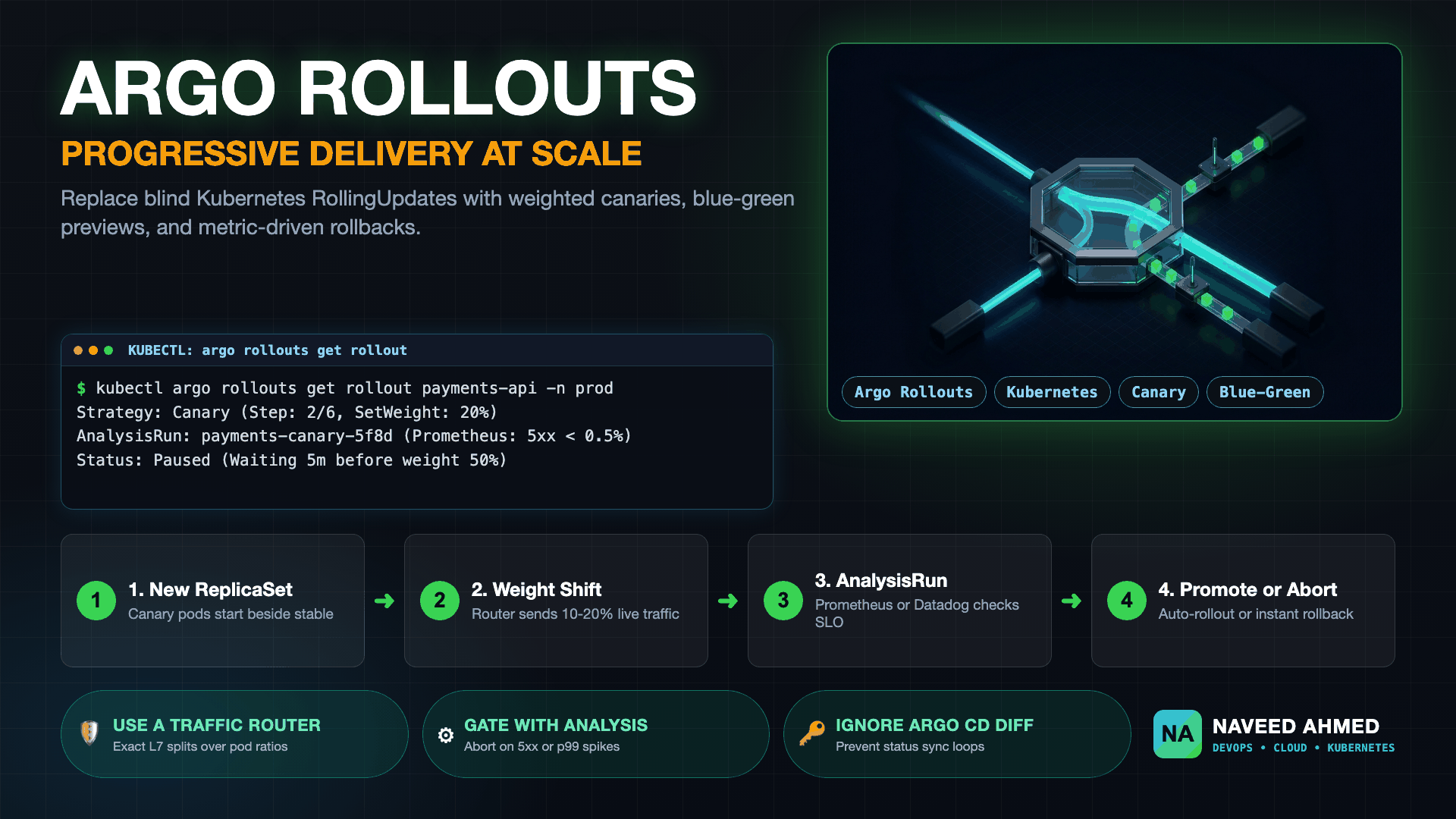
When you apply a Rollout manifest, the Argo Rollouts controller reconciles two ReplicaSets (stable and canary) instead of hand-rolling Deployment updates. At each step in spec.strategy, the controller updates traffic weights on your Ingress, Gateway API HTTPRoute, or service mesh, pauses for a fixed duration or manual approval, and spawns an AnalysisRun to query your observability backend.
Git or CI updates the pod template image tag on the Rollout.
Controller sets canary weight to 10% via NGINX, ALB, Istio, or Gateway API.
Queries Prometheus, Datadog, or a webhook for 5xx rate and p99 latency.
Healthy metrics advance to 50% and 100%; breaches trigger instant rollback.
Argo Rollouts vs Argo CD: What Is the Difference?
Teams new to the Argo ecosystem often ask whether Argo Rollouts replaces Argo CD. Both tools belong to the same CNCF project and share a similar UI style, yet they solve completely different layers of the release pipeline.
| Capability | Argo CD | Argo Rollouts |
|---|---|---|
| Primary layer | GitOps continuous delivery (syncing Git to cluster) | In-cluster progressive delivery (controlling pod and traffic cutover) |
| Core CRD | Application, ApplicationSet |
Rollout, AnalysisTemplate, AnalysisRun |
| Traffic splitting | None (applies manifests as written) | Canary weights, Blue-Green services, Experiment splits |
| Automated rollback | Reverts only on Git commit revert | Aborts and restores stable traffic on live metric failure |
In production, you run both together: Argo CD syncs the Rollout manifest from Git into the cluster, and Argo Rollouts orchestrates the canary steps inside the cluster. For multi-environment GitOps patterns, see our ArgoCD configuration drift guide.
How to Install Argo Rollouts (Helm Chart and kubectl Plugin)
For production clusters, install the controller with the official Argo Rollouts Helm chart rather than raw GitHub release YAML so you can pin chart versions, configure HA replicas, and toggle the dashboard cleanly.
1. Install via the Argo Rollouts Helm Chart
# Add the official Argo Helm repository
helm repo add argo https://argoproj.github.io/argo-helm
helm repo update

# Install Argo Rollouts with the optional web UI dashboard enabled
helm upgrade --install argo-rollouts argo/argo-rollouts \
  --namespace argo-rollouts \
  --create-namespace \
  --set controller.replicas=2 \
  --set dashboard.enabled=true

# Verify controller pods and CRDs
kubectl get pods -n argo-rollouts
kubectl get crds | grep argoproj.io
If you run a Gateway API controller (such as Envoy Gateway, Cilium, or Istio Gateway), install the Argo Rollouts Gateway API plugin alongside the Helm chart so the controller can mutate HTTPRoute weights.
2. Install the kubectl argo rollouts Plugin and UI
The kubectl argo rollouts CLI plugin gives you a live terminal tree of ReplicaSets, canary step progress, and AnalysisRun states, plus one-command access to the Argo Rollouts UI dashboard.
# macOS via Homebrew
brew install argoproj/tap/kubectl-argo-rollouts

# Linux (amd64)
curl -LO https://github.com/argoproj/argo-rollouts/releases/latest/download/kubectl-argo-rollouts-linux-amd64
chmod +x ./kubectl-argo-rollouts-linux-amd64
sudo mv ./kubectl-argo-rollouts-linux-amd64 /usr/local/bin/kubectl-argo-rollouts

# Verify plugin and open local dashboard on port 3100
kubectl argo rollouts version
kubectl argo rollouts dashboard -n prod
Argo Rollouts Canary Strategy with Traffic Routing
A Canary deployment exposes the new version to a small slice of production traffic before scaling up. You can run Canary in two modes: basic pod-ratio splitting (no traffic router required) or exact Layer-7 weighted routing (NGINX Ingress, AWS ALB, Istio, or Gateway API).
Pod-ratio splitting has a mathematical catch. If your Deployment runs 4 replicas and you set setWeight: 10, Kubernetes can only scale whole pods, so 1 out of 5 pods receives 20% of traffic instead of 10%. Pairing Argo Rollouts with a traffic router keeps pod counts independent from exact traffic percentages.
apiVersion: argoproj.io/v1alpha1
kind: Rollout
metadata:
  name: checkout-api
  namespace: prod
spec:
  replicas: 6
  revisionHistoryLimit: 3
  selector:
    matchLabels:
      app: checkout-api
  template:
    metadata:
      labels:
        app: checkout-api
    spec:
      containers:
        - name: checkout-api
          image: ghcr.io/acme/checkout-api:v2.4.0
          ports:
            - containerPort: 8080
  strategy:
    canary:
      canaryService: checkout-api-canary
      stableService: checkout-api-stable
      trafficRouting:
        nginx:
          stableIngress: checkout-api-ingress
      steps:
        - setWeight: 10
        - pause: { duration: 3m }
        - analysis:
            templates:
              - templateName: http-slo-check
            args:
              - name: service-name
                value: checkout-api-canary
        - setWeight: 50
        - pause: { duration: 5m }
        - analysis:
            templates:
              - templateName: http-slo-check
            args:
              - name: service-name
                value: checkout-api-canary
Notice the canaryService and stableService fields. Argo Rollouts injects a rollouts-pod-template-hash selector onto each Service automatically so stable traffic never leaks into canary pods.
Argo Rollouts Blue-Green Strategy
When an application cannot tolerate two versions running side by side for live users (for example, strict schema contracts or stateful session formats), use the Blue-Green strategy. Argo Rollouts spins up the full new ReplicaSet behind a previewService, runs optional pre-promotion analysis, and switches 100% of production traffic on activeService in a single selector update.
apiVersion: argoproj.io/v1alpha1
kind: Rollout
metadata:
  name: billing-worker
  namespace: prod
spec:
  replicas: 4
  selector:
    matchLabels:
      app: billing-worker
  template:
    metadata:
      labels:
        app: billing-worker
    spec:
      containers:
        - name: billing-worker
          image: ghcr.io/acme/billing-worker:v1.9.2
          ports:
            - containerPort: 8080
  strategy:
    blueGreen:
      activeService: billing-active
      previewService: billing-preview
      autoPromotionEnabled: false
      scaleDownDelaySeconds: 120
      prePromotionAnalysis:
        templates:
          - templateName: smoke-test-job
Setting scaleDownDelaySeconds: 120 keeps the old Blue ReplicaSet warm for two minutes after cutover. If users report an issue right after promotion, running kubectl argo rollouts undo billing-worker -n prod flips the selector back without waiting for pods to cold-start.
Automated Rollbacks with AnalysisTemplate (Prometheus & Datadog)
Manual pauses still rely on an engineer watching Grafana. An AnalysisTemplate turns your SLOs into an automated gate. During a rollout, Argo Rollouts creates an AnalysisRun, polls your metric provider on an interval, and aborts the release if failureCondition evaluates to true.
apiVersion: argoproj.io/v1alpha1
kind: AnalysisTemplate
metadata:
  name: http-slo-check
  namespace: prod
spec:
  args:
    - name: service-name
  metrics:
    - name: error-rate-5xx
      interval: 30s
      count: 6
      failureLimit: 2
      successCondition: result[0] <= 0.01
      failureCondition: result[0] > 0.01
      provider:
        prometheus:
          address: http://prometheus-operated.monitoring.svc:9090
          query: |
            sum(rate(http_requests_total{service="{{args.service-name}}",status=~"5.."}[2m]))
            /
            sum(rate(http_requests_total{service="{{args.service-name}}"}[2m]))
Two production details prevent false rollbacks here. First, set failureLimit: 2 so a single transient scrape glitch does not abort a healthy release. Second, handle division-by-zero in PromQL when a low-traffic canary has zero requests in the first 30 seconds (for instance, wrap the denominator or check isnan). If your team uses Datadog instead of Prometheus, swap the provider.prometheus block for provider.datadog using a Kubernetes Secret containing api-key and app-key.
For a full interview-grade breakdown of metric queries and failure thresholds, review our Argo Rollouts automated canary analysis scenario.
Day-2 Operations: CLI Commands Every SRE Needs
During an active release or incident, you will live inside the kubectl argo rollouts plugin:
# Watch live rollout progression, ReplicaSets, and AnalysisRuns
kubectl argo rollouts get rollout checkout-api -n prod --watch

# Manually advance past a pause step or approve Blue-Green cutover
kubectl argo rollouts promote checkout-api -n prod

# Skip all remaining pause and analysis steps immediately
kubectl argo rollouts promote checkout-api -n prod --full

# Abort a degraded canary and restore 100% traffic to stable
kubectl argo rollouts abort checkout-api -n prod

# Roll back to a prior revision after promotion
kubectl argo rollouts undo checkout-api -n prod
Production Argo Rollouts Issues and How to Fix Them
Most teams hit the same four operational snags during their first month with Argo Rollouts. Keep this triage table handy when a rollout stalls.
| Symptom | Root Cause | Fix & First Command |
|---|---|---|
Argo CD shows OutOfSync during canary |
Argo Rollouts mutates spec.replicas or Ingress annotations, and Argo CD tries to revert them. |
Add ignoreDifferences in Argo CD Application or disable spec.replicas when HPA manages scaling. |
Canary stays at Paused forever |
A step has pause: {} with no duration, waiting for manual approval. |
Run kubectl argo rollouts promote <name> or set duration: 5m. |
AnalysisRun fails with Inconclusive |
Prometheus returns NaN because zero requests hit the canary yet. |
Use default(result[0], 0) or start analysis after pause: { duration: 1m }. |
| 10% weight sends 50% traffic | No traffic router configured and total replicas = 2. | Wire NGINX, ALB, Istio, or Gateway API under trafficRouting. |
If you are troubleshooting wider cluster symptoms alongside a stalled rollout, cross-check our Kubernetes Production Scenario Handbook or test your command reflexes in the interactive Kubernetes quizzes and learning roadmap.
Key Takeaways
- Replace standard
Deploymentmanifests withRolloutwhen readiness probes alone cannot catch runtime regressions, latency spikes, or partial failures. - Install Argo Rollouts with the official Helm chart and pair it with a Layer-7 traffic router (NGINX, AWS ALB, Istio, or Gateway API) so traffic percentages are exact regardless of replica count.
- Attach an
AnalysisTemplateto every canary step using Prometheus or Datadog queries withfailureLimitand zero-traffic guards to prevent false aborts. - Always keep
scaleDownDelaySecondsnon-zero on Blue-Green rollouts so instant rollbacks do not wait on pod startup.
Frequently Asked Questions
Direct answers to frequent engineering questions regarding AI coding agent disruptions, entry-level career outlooks, computer science degree value, and the changing landscape of software development roles in production environments.
What is Argo Rollouts used for in Kubernetes?
Argo Rollouts is a Kubernetes controller and set of Custom Resource Definitions (CRDs) that implements progressive delivery. It replaces the built-in Deployment object with a Rollout resource supporting Canary traffic shifting, Blue-Green preview cutovers, and automated metric-based rollbacks.
What is the difference between Argo Rollouts and Argo CD?
Argo CD is a GitOps continuous delivery tool that syncs Kubernetes manifests from Git into a cluster. Argo Rollouts is an in-cluster progressive delivery controller that manages how pods and traffic shift during a release. Most production teams run both together.
Do I need a service mesh like Istio to use Argo Rollouts?
No. Without a traffic router, Argo Rollouts still performs Canary releases by adjusting ReplicaSet pod counts, and Blue-Green releases by switching Kubernetes Service selectors. Adding Gateway API, NGINX Ingress, AWS ALB, or Istio unlocks exact percentage-based Layer-7 traffic splitting.
How do I install Argo Rollouts using the Helm chart?
Add the argo Helm repository (https://argoproj.github.io/argo-helm), then run helm upgrade --install argo-rollouts argo/argo-rollouts -n argo-rollouts --create-namespace. Enable dashboard.enabled=true in values if you want the Argo Rollouts UI.
How does Argo Rollouts trigger an automatic rollback?
A Rollout references an AnalysisTemplate or ClusterAnalysisTemplate during its canary or blue-green steps. The controller creates an AnalysisRun that queries Prometheus, Datadog, or a webhook. If the metric breaches the failureCondition threshold, Argo Rollouts aborts the rollout and routes 100% of traffic back to the stable ReplicaSet.