Modern application development requires coordinating multiple interconnected software components: API servers, background task workers, caching layers, and relational databases. Running these microservices manually using individual Docker container commands quickly becomes brittle and difficult to maintain. Managing port bindings, network namespaces, persistent volume attachments, and startup order across several shell scripts introduces configuration drift and operational errors.
This is where Docker Compose and container images provide a standardized foundation. Understanding what is Docker Compose and what is docker image enables engineering teams to transition from isolated, manual container execution to declarative, reproducible multi-container environments.
What is Docker Compose? Core Architecture and Workflow
Docker Compose is a declarative tool for defining and running multi-container Docker applications. Through a YAML configuration file, Compose coordinates service lifecycles, creates dedicated bridge networks, manages persistent storage volumes, and handles container dependencies, enabling developers to provision complex distributed stacks with a single CLI command.
At its architectural foundation, Docker Compose operates as a client-side orchestration layer built on top of the Docker Engine API. Rather than executing manual shell commands such as docker run, docker network create, and docker volume create for each service, Docker Compose reads an application specification file (typically named compose.yaml or docker-compose.yml) and translates the declared state into corresponding Docker Engine API requests.
Declares services, Docker images, environment variables, networks, and persistent storage volumes.
Parses configuration, builds dependency graphs, and executes Docker Engine API calls.
Pulls images, allocates bridge networks, attaches volumes, and initializes isolated container processes.
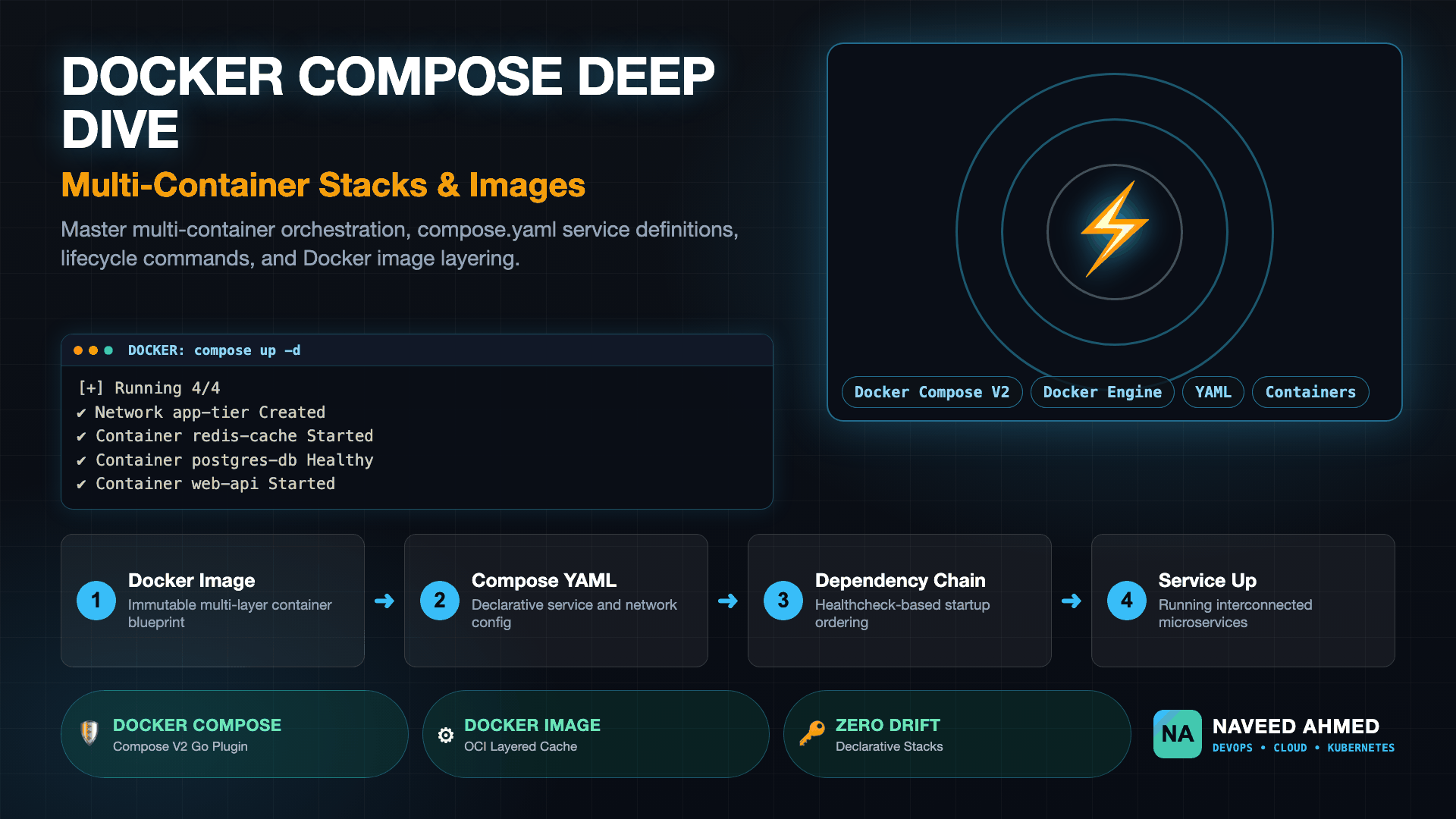
When you execute a Docker Compose command like docker compose up, Compose executes the following sequence:
- Configuration validation evaluates the YAML schema, merges environment variables from
.envfiles, and resolves service dependency graphs. - Network provisioning creates an isolated application bridge network (by default named
<project_name>_default) enabling automatic DNS resolution between service names. - Volume attachment allocates local or external storage volumes to ensure database state and cache data persist across container restarts.
- Container instantiation concurrently pulls or builds required container images and launches the containers in the correct sequence based on health checks and dependencies.
The 970+ Incident Handbook & K8s Runbooks are exclusive to subscribers — unlock for FREE
Get battle-tested production runbooks, AWS architecture blueprints, and zero-downtime CI/CD post-mortems sent directly to your inbox. 100% free, no spam.
What is Docker Image and How Compose Uses Images?
A Docker image is a read-only, immutable package containing application source code, runtime binaries, dependencies, system libraries, and default environment variables arranged in stacked filesystem layers. Docker Compose references these images either by pulling pre-built tags from registries or triggering automated local Dockerfile builds through service configuration directives.
To understand how Docker Compose orchestrates applications, one must first grasp what is docker image. An image acts as the static blueprint for a container. Built according to the Open Container Initiative (OCI) image specification, a Docker image consists of a cryptographic manifest and a collection of read-only tarball layers stacked using an overlay filesystem (such as OverlayFS).
When a container starts from an image, the Docker Engine places a thin, read-write container layer on top of these immutable image layers. Any files modified, added, or deleted during runtime live exclusively in this ephemeral layer, leaving the underlying base image untouched.
Referencing Images vs Building from Dockerfiles
Inside a Compose specification, a service can consume a docker image in two distinct ways:
- The
image:directive instructs Compose to pull a pre-built image tag from Docker Hub, GitHub Container Registry (GHCR), or AWS Elastic Container Registry (ECR). For instance, a cache service might specifyimage: redis:7-alpine. - The
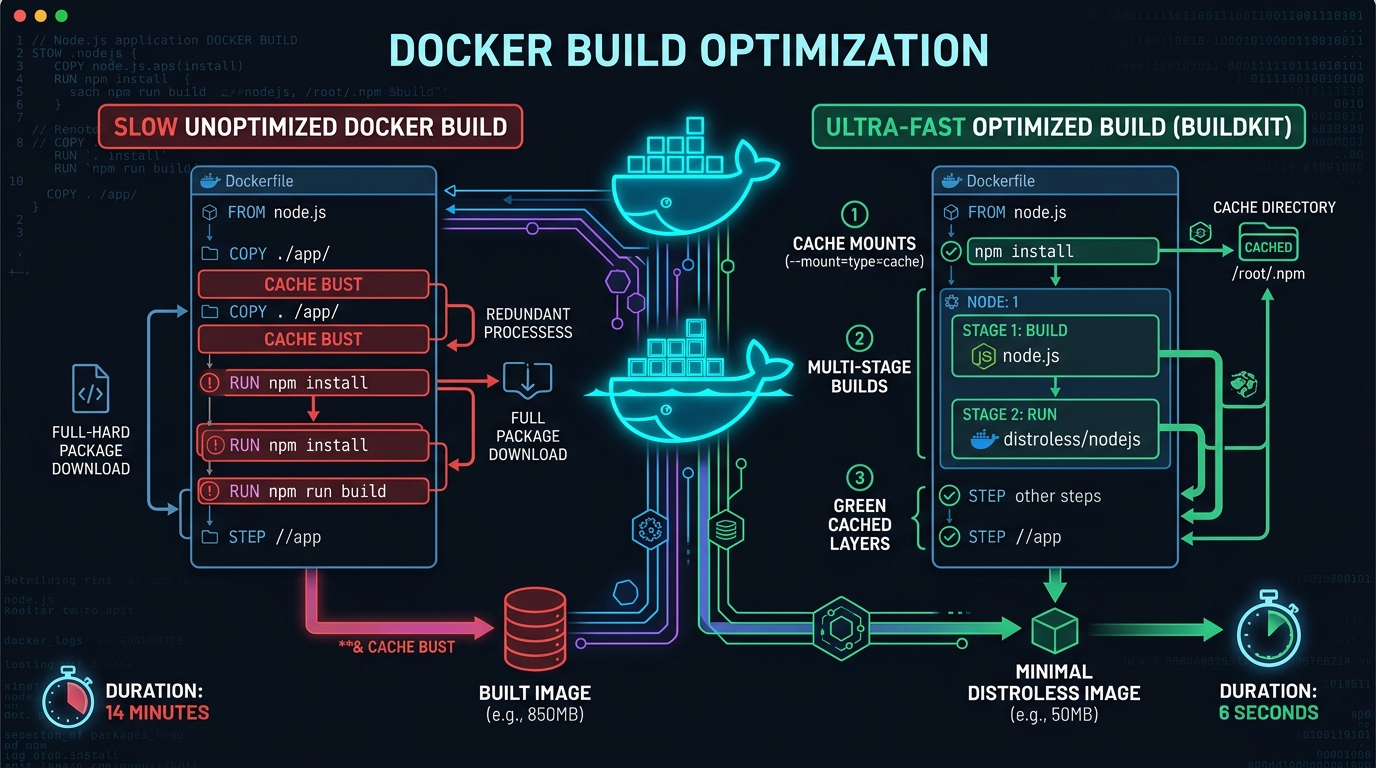
build:directive instructs Compose to execute a localdocker buildusing a specifiedDockerfilecontext. Compose can pass custom build arguments, target specific build stages in a multi-stage Dockerfile, and leverage BuildKit cache mounts.
For production build speed and layer caching optimizations, review our guide on Docker image layer caching and build speed.
What is Docker Compose vs Docker? Architectural Comparison
While Docker focuses on individual container execution through imperative CLI commands, Docker Compose manages interconnected multi-container applications declaratively. Docker creates single containers, networks, and volumes in isolated steps; Docker Compose coordinates the collective lifecycle, dependency graph, internal DNS discovery, and environment configuration of multiple containers from a unified specification.
Engineers frequently ask what is docker compose vs docker and how the two tools fit into an infrastructure pipeline. Standalone Docker Engine provides the low-level container runtime primitives: Linux cgroups, namespaces, seccomp profiles, and storage drivers. However, standard Docker commands are strictly imperative. If your application requires an API server, a Redis cache, and a PostgreSQL database, running them with standard Docker requires executing multiple manual commands:
# Imperative standalone Docker commands (manual and error-prone)
docker network create my-app-net
docker volume create pg-data

docker run -d --name db --net my-app-net -v pg-data:/var/lib/postgresql/data -e POSTGRES_PASSWORD=secret postgres:16-alpine
docker run -d --name redis --net my-app-net redis:7-alpine
docker run -d --name api --net my-app-net -p 8080:8080 -e DB_HOST=db -e REDIS_HOST=redis my-api:latest
If the database takes ten seconds to initialize its schema, the API container starts immediately and crashes. With Docker Compose, this entire topology is declared in a single file with health checks, dependencies, and network parameters versioned alongside your codebase in Git.
| Operational Dimension | Standalone Docker CLI | Docker Compose (V2) | Kubernetes (K8s) |
|---|---|---|---|
| Configuration Model | Imperative CLI flags (docker run -p -v -e) |
Declarative YAML (compose.yaml) |
Declarative YAML (Deployments, Services, ConfigMaps) |
| Scope | Single container process | Multi-container application stack | Distributed cluster across multiple nodes |
| Networking & DNS | Manual network creation and linking | Automatic default bridge network with service DNS | Cluster-wide CoreDNS with CNI overlay networks |
| Dependency Management | None (containers launch independently) | Native depends_on with service_healthy |
InitContainers and startup probes |
| Storage Volumes | Manual volume creation and mounting | Declarative top-level volume definitions | PersistentVolumeClaims (PVCs) and StorageClasses |
| Target Environment | Ad-hoc testing and single-node utilities | Local development and single-node staging | Production multi-node enterprise infrastructure |
When your infrastructure outgrows a single virtual machine and requires autoscaling or multi-node redundancy, you can convert your Compose stacks to Kubernetes manifests using our Docker Compose to Kubernetes Migration tool.
What is Docker Compose YML Used For? Structure and Anatomy
A Docker Compose YML file (typically named compose.yaml or docker-compose.yml) defines the complete configuration for an application stack. It serves as an executable architectural document specifying container images, environment variables, published network ports, persistent volume mounts, CPU and memory resource limits, and healthcheck dependencies.
When evaluating what a Compose file is used for, consider it the single source of truth for your application environment. A developer can clone a repository containing a Compose file, run one command, and have an entire working environment with databases, message queues, and API services running identically on macOS, Linux, or Windows.
Anatomy of a Compose File: Services, Networks, and Volumes
A modern Compose file follows the Compose Specification and contains four primary top-level sections:
- The
servicessection defines the computing workloads. Each service defines a container configuration, including the image to pull or build, environment variables, exposed ports, restart policies, and healthchecks. - The
networksblock defines the software-defined networks that facilitate container communication. By default, Compose creates a bridge network, but you can configure custom drivers, IPAM subnets, or external networks. - The
volumessection declares named storage volumes managed by the Docker Engine. Named volumes persist independently of container lifecycles, ensuring database records survive container recreation. - The
secretsandconfigsblocks manage sensitive credentials and configuration files without embedding them into container images or committing them to source control.
Docker Compose YML Example: Production-Grade Multi-Service Stack
Here is a comprehensive docker compose yml example demonstrating a modern three-tier application: an API web service, a PostgreSQL database with health checks, and a Redis in-memory cache.
# compose.yaml - Modern Docker Compose Specification Example
services:
  web-api:
    build:
      context: ./api
      dockerfile: Dockerfile
    image: mycompany/web-api:1.4.0
    container_name: web-api
    restart: unless-stopped
    ports:
      - "8080:8080"
    environment:
      NODE_ENV: production
      PORT: 8080
      DATABASE_URL: postgres://app_user:app_pass@postgres-db:5432/app_production
      REDIS_URL: redis://redis-cache:6379/0
    depends_on:
      postgres-db:
        condition: service_healthy
      redis-cache:
        condition: service_started
    networks:
      - backend-net
    deploy:
      resources:
        limits:
          cpus: "1.50"
          memory: 512M

  postgres-db:
    image: postgres:16-alpine
    container_name: postgres-db
    restart: unless-stopped
    environment:
      POSTGRES_DB: app_production
      POSTGRES_USER: app_user
      POSTGRES_PASSWORD: app_pass
    volumes:
      - postgres-data:/var/lib/postgresql/data
    healthcheck:
      test: ["CMD-SHELL", "pg_isready -U app_user -d app_production"]
      interval: 5s
      timeout: 5s
      retries: 5
      start_period: 10s
    networks:
      - backend-net

  redis-cache:
    image: redis:7-alpine
    container_name: redis-cache
    restart: unless-stopped
    command: ["redis-server", "--appendonly", "yes"]
    volumes:
      - redis-data:/data
    networks:
      - backend-net

networks:
  backend-net:
    driver: bridge

volumes:
  postgres-data:
    driver: local
  redis-data:
    driver: local
Notice the use of condition: service_healthy under depends_on. Without this health check directive, Compose starts the web-api container immediately after launching PostgreSQL, before the database server is ready to accept socket connections. For a detailed breakdown of this pattern, read our scenario on orchestrating microservices with Docker Compose v2 healthcheck dependencies. Furthermore, configure memory limits per our deep dive on setting Docker Compose resource limits for CPU and memory.
How to Install Docker Compose and Version Management
Docker Compose is currently distributed as a native Docker CLI plugin (Compose V2). On modern Linux distributions, you install Compose via official Docker APT or YUM repositories or package managers, while Docker Desktop for macOS and Windows includes the plugin automatically. Verifying the installation requires executing docker compose version.
Understanding how to install docker compose requires distinguishing between the modern Compose V2 CLI plugin and legacy standalone binary implementations.
Docker Compose Plugin (Compose V2) vs V1 Standalone
For many years, Docker Compose existed as a standalone Python script installed via pip or downloaded as an executable binary named docker-compose (with a hyphen). This legacy V1 implementation suffered from slow startup times, external Python runtime dependencies, and discrepancies with the primary Docker CLI engine.
Docker completely re-engineered Compose in Go as a native Docker CLI plugin (Compose V2). When you invoke docker compose (with a space), Docker executes the Compose plugin directly inside the Docker CLI process tree. Compose V2 delivers significant advantages:
- Native Go performance with fast execution and low memory consumption.
- Direct integration with Docker BuildKit for parallel, cached image builds.
- Consistent CLI flag conventions matching standard Docker commands.
- Active maintenance, security patches, and support for the latest Compose Specifications.
Installation Commands and Docker Compose Version Verification
On Debian and Ubuntu systems, install the plugin using official Docker package repositories:
# Update package index and install Docker Compose plugin
sudo apt-get update
sudo apt-get install -y docker-compose-plugin

# Verify the Docker Compose latest version installed
docker compose version
Executing docker compose version produces output confirming the active plugin release:
Docker Compose version v2.29.2
If you run legacy automation scripts that still call docker-compose with a hyphen, install the docker-compose-v2 compatibility bridge or create an alias: alias docker-compose="docker compose".
Docker Compose Command Reference: Managing Stack Lifecycles
The Docker Compose command interface controls the entire operational lifecycle of multi-service applications through declarative verbs. Key commands include docker compose up to construct and start services, docker compose down to gracefully stop and clean up resources, and docker compose ps to inspect runtime container status, port mappings, and healthchecks.
Operating container stacks efficiently requires understanding each core Docker Compose command and how it impacts system state.
Managing Lifecycles with docker compose up
The most frequently used command is docker compose up. When you execute this command, Compose assesses the current runtime state against the declared specification in compose.yaml.
# Launch the stack in detached mode (background process)
docker compose up -d

# Sample execution log:
# [+] Running 4/4
#  ✔ Network what-is-docker-compose_backend-net  Created
#  ✔ Container postgres-db                      Healthy
#  ✔ Container redis-cache                      Started
#  ✔ Container web-api                          Started
Essential flags for docker compose up include:
-d: Detached mode. Runs containers in the background and releases your terminal prompt.--build: Forces Compose to rebuild any local Dockerfile images before starting services, ignoring cached local images.--force-recreate: Recreates containers even if their configuration and image layers have not changed.--wait: Blocks terminal exit until all services with defined health checks reach a healthy state.
Tearing Down Resources with docker compose down
When you need to stop your application stack, docker compose down provides clean resource management. Running this command performs an orderly teardown:
- Sends a
SIGTERMsignal to each running container process. - Waits for a grace period (defaulting to 10 seconds) for applications to close active database connections and complete requests.
- Sends a
SIGKILLsignal if processes fail to terminate within the timeout window. - Removes stopped containers and tears down application-specific bridge networks.
# Stop containers and remove default networks
docker compose down

# Stop containers, remove networks, AND delete all declared named volumes
docker compose down -vdocker compose down -v deletes all named volumes defined in your Compose file (such as your PostgreSQL database data directory). Use the -v flag only when you intend to perform a complete state reset.
Inspecting Services with docker compose ps
To inspect the health and operational status of your running stack, execute docker compose ps:
# List all active containers in the current Compose project
docker compose ps

# Sample output:
# NAME          IMAGE                COMMAND                  SERVICE       CREATED         STATUS                   PORTS
# postgres-db   postgres:16-alpine   "docker-entrypoint.s…"   postgres-db   2 minutes ago   Up 2 minutes (healthy)   5432/tcp
# redis-cache   redis:7-alpine       "docker-entrypoint.s…"   redis-cache   2 minutes ago   Up 2 minutes             6379/tcp
# web-api       mycompany/web-api    "docker-entrypoint.s…"   web-api       2 minutes ago   Up 2 minutes             0.0.0.0:8080->8080/tcp
Adding the -a flag shows stopped and failed containers with their exit status codes, which assists in diagnosing startup crashes. Other indispensable operational commands include:
docker compose logs -f <service>: Streams real-time aggregate logs from one or all services.docker compose exec <service> sh: Opens an interactive shell inside a running container for live debugging.docker compose restart <service>: Restarts a single container without restarting the rest of the application stack.
Production Considerations: Moving from Local Stacks to Scaled Environments
While Docker Compose provides an exceptional developer workflow for local development, utilizing it in production environments requires careful operational hygiene:
- Separate environment variables and store sensitive secrets or connection strings in secure vault systems or pass them through encrypted CI/CD pipeline variables rather than hardcoding credentials inside
compose.yaml. - Configure logging drivers deliberately. Because Docker writes JSON logs to the host disk by default, set the
json-filelog driver withmax-sizeandmax-filerotation options to prevent containers from exhausting host disk space. - Decouple persistence for high-availability workloads. Point application services to managed database clusters (such as AWS RDS) rather than running stateful database containers inside single-node Compose instances.
- For complex distributed event systems, examine our architecture guide on running Kafka with Docker Compose.
Summary and Key Takeaways
Understanding what is Docker Compose and what is docker image forms the basis for effective containerized workflows. A Docker image provides the immutable, layered application package, while Docker Compose delivers the declarative orchestration framework required to configure networks, persistent storage, and dependencies across multi-container topologies.
By mastering the Compose specification, adopting the modern Compose V2 plugin, and employing structured healthchecks, engineering teams eliminate configuration drift and ensure reliable, repeatable deployments across development and staging environments.
Frequently Asked Questions
Direct answers to frequent engineering questions regarding AI coding agent disruptions, entry-level career outlooks, computer science degree value, and the changing landscape of software development roles in production environments.
What is Docker Compose and what is it used for?
Docker Compose is an orchestration tool for defining and running multi-container Docker applications. Using a single YAML configuration file (compose.yaml or docker-compose.yml), you declare application services, isolated networks, storage volumes, environment variables, and startup dependencies, launching the entire stack with a single command.
What is docker image vs Docker Compose?
A Docker image is an immutable, read-only template composed of stacked filesystem layers used to launch individual containers. Docker Compose does not replace Docker images. Instead, Compose orchestrates how multiple Docker images are built, configured, networked, and run together as an interconnected microservice stack.
What is Docker Compose vs Docker CLI?
The standard Docker CLI operates imperatively on single containers one command at a time. In contrast, Docker Compose provides declarative multi-container management. Compose automates service discovery, container networking, persistent volume binding, and dependency-ordered initialization from a single configuration file.
What is docker compose up command?
The docker compose up command evaluates your Compose configuration file, creates required networks and storage volumes, pulls or builds specified container images, and starts all services in the declared dependency order. Adding the -d flag runs the entire application stack in detached background mode.
What is Docker Compose plugin (Compose V2) vs legacy docker-compose?
Compose V2 is written in Go and integrated directly into the Docker engine CLI as a native plugin invoked as 'docker compose'. It completely replaces the deprecated Python-based standalone 'docker-compose' binary (V1), delivering faster execution, native BuildKit integration, and uniform command syntax.