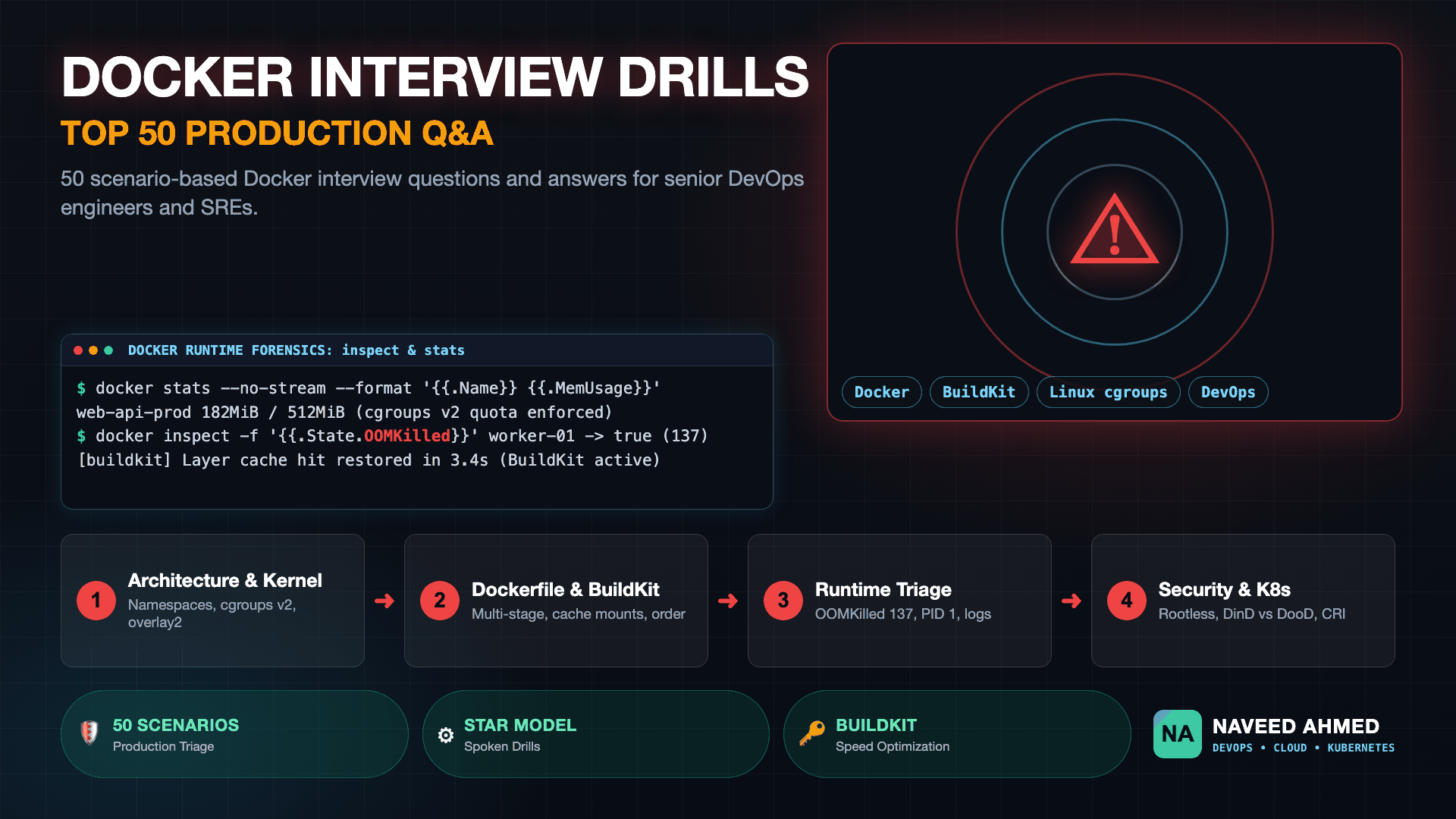
Mastering docker interview questions requires demonstrating deep kernel subsystem intuition, layer caching discipline, and live incident triage heuristics. In production hiring loops, interviewers test your ability to diagnose OOMKilled containers, eliminate CI pipeline build bottlenecks using BuildKit, secure container daemon sockets, and architect zero-downtime microservices deployments.
Whether you are preparing for a junior DevOps role or a staff site reliability engineering loop, the expectations shift dramatically. Junior interviews emphasize fundamental container commands, image creation, and port publishing. Experienced loops (5 to 10+ years) probe Linux kernel isolation boundaries, storage driver I/O saturation, multi-stage compilation DAGs, and container orchestrator runtime migrations. This guide collects 50 production-tested interview questions and answers, organized into structured domains with real terminal runbooks and architectural decision frameworks. You can also drill interactive scenarios across our 159+ scenario-based Docker interview questions and practice layer reordering in the Docker Build Speed Arcade Game.
Module 1: Basic Docker Interview Questions & Engine Architecture (Q1–Q10)
Basic docker interview questions evaluate candidate comprehension of container virtualization versus hypervisor virtual machines. The Docker engine utilizes Linux kernel namespaces for process isolation and control groups (cgroups) for hardware resource quotas. Understanding daemon architecture, client socket communication, and container lifecycles forms the essential foundation for answering entry-level and intermediate DevOps interview prompts.
Q1: What is Docker and how does a container differ from a virtual machine?
A container is an isolated user space process running directly on the host operating system kernel. Unlike virtual machines, which require a full guest operating system and hypervisor hardware emulation (Type 1 or Type 2), containers share the host Linux kernel. This architectural difference allows containers to initialize in milliseconds, consume megabytes rather than gigabytes of memory, and deliver near-native CPU and disk I/O throughput.
Q2: What Linux kernel primitives make container isolation possible?
Containers rely on three core Linux kernel subsystems:
- Namespaces (What you can see): Isolates system resources per container, including PID (process tree), NET (network interfaces and routing tables), MNT (filesystem mount points), IPC (inter-process communication), UTS (hostnames), and USER (UID/GID mappings).
- Control Groups / cgroups v2 (How much you can use): Enforces hardware resource caps and accounting for CPU, memory, disk I/O bandwidth, and maximum process counts (pids.max).
- Chroot / Pivot_root & Securables: Restricts root filesystem access, while Seccomp profiles and AppArmor/SELinux confine available system calls.
Q3: Explain the core Docker architecture components: CLI, Daemon, containerd, and runc.
The Docker platform is modularized into distinct decoupling tiers according to Open Container Initiative (OCI) standards:
- Docker CLI: The user-facing command-line tool that talks to dockerd via REST API over the local UNIX socket
/var/run/docker.sockor remote TLS TCP endpoints. - Dockerd (Docker Daemon): Handles high-level client requests, image builds, volumes, credentials, and network bridging.
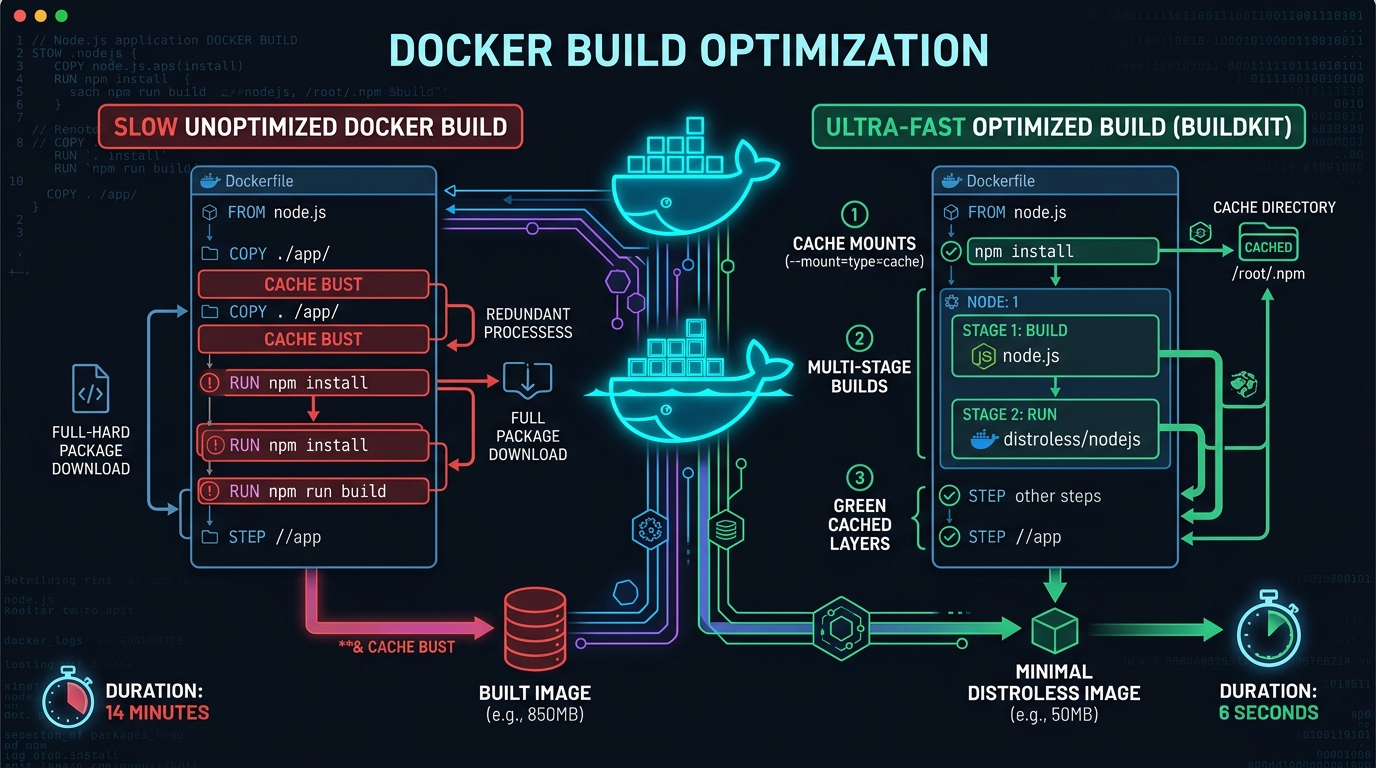
- containerd: An industry-standard core container runtime managing the complete container lifecycle, image transfers, and execution supervisors.
- runc: A lightweight CLI runtime tool conforming to the OCI runtime specification that directly invokes Linux kernel syscalls (clone, unshare, setns) to spawn container processes.
Q4: What is the difference between a Docker image and a Docker container?
A Docker image is a read-only, immutable template consisting of stacked cryptographic filesystem layers defined by an OCI manifest. A Docker container is a stateful, running instance of an image. When you execute docker run, the container engine stacks a thin, read-write layer (the container layer) on top of the immutable image layers using copy-on-write storage drivers.
Q5: What are the primary states in a container lifecycle?
A container transitions through Created (read-write layer allocated via docker create), Running (PID 1 process active via docker start or docker run), Paused (all processes frozen via cgroup freezer), Stopped / Exited (PID 1 terminated via SIGTERM/SIGKILL or process completion), and Dead (partially unmounted zombie state during unrecoverable daemon errors).
Q6: How does port publishing (-p) differ from port exposing (EXPOSE)?
EXPOSE in a Dockerfile functions merely as metadata documentation between the author and consumer; it applies zero network configuration to the host firewall. In contrast, passing -p 8080:80 to docker run instructs Docker to configure Linux iptables/nftables NAT rules on the host, binding host port 8080 and forwarding incoming TCP packets to internal container port 80.
Q7: What is the purpose of the .dockerignore file?
The .dockerignore file prevents specified local directories and files (such as .git, node_modules, build artifacts, temporary log files, and local .env secrets) from being uploaded to the Docker daemon build context. This speeds up build initialization and prevents accidental credential leaks into intermediate image layers.
Q8: How do you clean up unused Docker disk space safely?
DevOps engineers prune dangling and stopped resources using the system prune command suite:
# Remove stopped containers, unused networks, and dangling images
docker system prune -f

# Thorough cleanup including build cache and unreferenced images
docker system prune -a --volumes --force

# Inspect detailed disk footprint across containers, images, and local volumes
docker system df -v
Q9: What happens when PID 1 exits inside a container?
Inside a Linux PID namespace, the container process tree is anchored to PID 1. If PID 1 terminates, the Linux kernel terminates all remaining descendant child processes inside that namespace with SIGKILL and marks the container in the Exited state. If PID 1 does not implement proper signal forwarding (such as handling SIGTERM and reaping defunct zombie children), background worker processes can hang.
Q10: What are the differences between docker attach, docker exec, and docker logs?
docker attach connects your terminal standard streams directly to the running container's primary PID 1 process. docker exec spawns an entirely new child process inside the existing namespaces of an active container (e.g., docker exec -it web-api /bin/sh). docker logs fetches collected stdout/stderr streams from the configured logging driver (json-file, journald, or syslog).
The 970+ Incident Handbook & K8s Runbooks are exclusive to subscribers — unlock for FREE
Get battle-tested production runbooks, AWS architecture blueprints, and zero-downtime CI/CD post-mortems sent directly to your inbox. 100% free, no spam.
Module 2: Dockerfile Optimization & Image Packaging (Q11–Q20)
Dockerfile interview questions focus on layer caching mechanics, multi-stage compilation patterns, and image security minimization. High-volume CI/CD build performance depends directly on instruction order. Structuring Dockerfiles to isolate dynamic application source code from static dependency manifests prevents costly cache invalidation loops and cuts compilation durations across enterprise development teams.
| Directive / Feature | Standard Syntax | Execution Behavior | Recommended Best Practice |
|---|---|---|---|
| ENTRYPOINT vs CMD | ENTRYPOINT ["node"] |
Sets fixed binary; CMD passes overridable default arguments | Use exec JSON array form; avoid shell wrapping |
| COPY vs ADD | COPY package*.json ./ |
COPY duplicates local files; ADD auto-extracts tar archives and fetches URLs | Default to COPY for predictable layer cache evaluation |
| BuildKit Cache Mount | RUN --mount=type=cache |
Preserves compiler cache directories across builds without layer bloat | Use for apt, npm, pip, go-build, and cargo state |
| Distroless Packaging | FROM gcr.io/distroless/static |
Omits package managers, shells, and system utilities from runtime | Reduces container attack surface and eliminates CVE noise |
Q11: What is the exact difference between CMD and ENTRYPOINT?
ENTRYPOINT specifies the constant executable process that will always run when the container starts. CMD supplies default parameters to that executable. If a user passes arguments to docker run my-image arg1 arg2, those arguments completely override CMD but append to ENTRYPOINT.
# Production pattern combining both:
ENTRYPOINT ["/usr/local/bin/my-app"]
CMD ["--config", "/etc/app.yaml", "--port", "8080"]

# Invoking 'docker run my-app --debug' executes:
# /usr/local/bin/my-app --debug
Q12: Why should you always prefer the exec form over the shell form in Dockerfiles?
The shell form (CMD python app.py) invokes the command via /bin/sh -c "python app.py", making /bin/sh PID 1 instead of your application. When the container stops, the Docker daemon sends a SIGTERM signal to PID 1 (the shell), which by default does not forward signals to child processes. This prevents your application from executing graceful shutdown routines and forces the daemon to issue a SIGKILL after 10 seconds. The exec form (CMD ["python", "app.py"]) launches your executable directly as PID 1, receiving signals instantly.
Q13: How does Docker layer caching work under the hood?
During a build, Docker computes a cryptographic SHA256 checksum for each instruction. For RUN instructions, it evaluates the parent layer's hash and the exact command text. For COPY and ADD, it calculates checksums of the files being copied from the host. If a cache miss occurs at step N, Docker invalidates the cache for step N and forces every subsequent instruction (steps N+1 to end) to rebuild from scratch. You can deep dive into this topic in our guide on cutting Docker build times by 90%.
Q14: How do you structure a multi-stage Dockerfile for a production Node.js or Go service?
A multi-stage build separates the heavy compilation environment (SDKs, build tools, package managers) from the lean runtime container:
# Stage 1: Compiler & Build Environment
FROM golang:1.24-alpine AS builder
WORKDIR /src
COPY go.mod go.sum ./
RUN --mount=type=cache,target=/go/pkg/mod go mod download
COPY . .
RUN --mount=type=cache,target=/root/.cache/go-build     CGO_ENABLED=0 GOOS=linux go build -ldflags="-s -w" -o /bin/api .

# Stage 2: Distroless Minimal Production Runtime
FROM gcr.io/distroless/static-debian12:nonroot
USER nonroot:nonroot
COPY --from=builder /bin/api /bin/api
EXPOSE 8080
ENTRYPOINT ["/bin/api"]
Q15: What are BuildKit cache mounts and how do they eliminate build waste?
BuildKit cache mounts (RUN --mount=type=cache,target=/root/.cache) mount persistent host directory volumes specifically during intermediate build steps. Unlike traditional RUN commands that bake downloaded cache packages into intermediate image layers, cache mounts maintain package caches across iterative build runs on the same builder without including those temporary files in the final image artifact.
Q16: How do you safely inject build secrets without leaking them into image history?
Never use ENV or standard ARG instructions for API keys, SSH keys, or access tokens, as they are recorded permanently in image metadata via docker history. Use BuildKit secret mounts instead: RUN --mount=type=secret,id=npmrc,target=/root/.npmrc npm install. The secret is exposed only inside memory for that individual execution step and is never saved to any filesystem layer.
Q17: What is the difference between COPY and ADD instructions?
COPY only copies local files and directories from the host build context into the container filesystem. ADD supports two additional capabilities: automatic decompression of local tar archives (gzip, bzip2) into the destination directory, and fetching files from remote HTTP URLs. In enterprise production, COPY is strictly preferred for transparency and predictable layer caching unless tar extraction is required.
Q18: How do you reduce image size from 1.2GB to under 50MB?
Shrinking oversized images involves four techniques: adopting minimal base images (Alpine Linux, Chainguard, or Distroless), using multi-stage builds to discard compilers and header files, stripping debugging symbols (-ldflags="-s -w" in Go), and chaining package installation commands with cache cleaning in a single layer (e.g., apt-get install -y --no-install-recommends && rm -rf /var/lib/apt/lists/*).
Q19: What is the function of the HEALTHCHECK directive?
The HEALTHCHECK directive tells Docker how to test whether the container process is functionally healthy rather than merely running. It periodically executes a command (e.g., HEALTHCHECK --interval=30s --timeout=3s CMD curl -f http://localhost:8080/health || exit 1). The container transitions from starting to healthy or unhealthy, allowing Docker Swarm or load balancers to withhold routing traffic from deadlocked containers.
Q20: How do you enforce non-root user execution in production images?
By default, containers execute as UID 0 (root). If a container breakout vulnerability occurs, the attacker gains root privileges on the underlying host. Secure Dockerfiles create an unprivileged user, assign necessary file permissions, and switch users before runtime: RUN groupadd -g 1001 app && useradd -u 1001 -g app -s /bin/sh app && USER 1001:1001.
Module 3: Advanced Storage, Networking & Daemon Triage (Q21–Q30)
Advanced docker interview questions explore the performance and operational boundaries of container storage drivers and network bridges. Engineers must articulate how the overlay2 union filesystem merges directory layers, when to utilize named volumes over host bind mounts, how embedded container DNS resolves microservices names, and how to triage daemon connection timeouts.
Q21: How does the overlay2 storage driver work in Linux?
The overlay2 driver is a Linux union filesystem that stacks directories together and presents them as a single unified tree. It operates using four key concepts:
- Lowerdir: Read-only immutable directories containing your base image layers.
- Upperdir: The top-level read-write container layer where all file additions and edits reside.
- Merged: The unified mount point viewed by the containerized application.
- Workdir: An internal directory used by the kernel to prepare file changes before exposing them in the merged view.
Q22: What are the differences between Volumes, Bind Mounts, and tmpfs mounts?
Volumes are managed exclusively by Docker inside /var/lib/docker/volumes/; they are portable, decoupled from host filesystem layouts, and support volume plugins. Bind mounts map an arbitrary directory on the host directly into the container (relying on host path dependencies and file permissions). tmpfs mounts reside solely in host system memory, never writing data to the persistent disk layer (ideal for temporary session caches or sensitive security secrets).
Q23: How do Docker networks work: Bridge, Host, Overlay, and None?
Bridge (Default): Creates a virtual software switch (e.g., docker0) providing container IP assignment and NAT masquerading to access external networks. Host: Disables network isolation entirely; the container shares the host network stack, eliminating NAT overhead for ultra-low latency workloads. Overlay: Enables multi-host routing across a cluster of Docker daemons using VXLAN packet encapsulation (standard in Docker Swarm). None: Completely closes all network access, providing an isolated loopback interface.
Q24: How does container service discovery work on user-defined bridge networks?
On the default legacy bridge network, containers can only communicate with each other using raw IP addresses unless linked using the deprecated --link flag. On custom user-defined networks (docker network create my-net), Docker runs an embedded DNS server at 127.0.0.11. Containers query this local DNS resolver to automatically resolve other containers by their container name or service alias.
Q25: What causes 'Cannot connect to the Docker daemon at unix:///var/run/docker.sock'?
This error indicates either the Docker service is stopped (sudo systemctl status docker), the user lacks permission to access the UNIX socket (fix by adding the user to the docker group via sudo usermod -aG docker $USER), or a deadlocked daemon left an orphaned socket file. If the daemon crashed due to an out-of-disk condition, inspect journalctl -u docker.service --no-pager -n 50.
Q26: How do you configure log rotation for the Docker daemon to prevent disk exhaustion?
By default, the json-file logging driver stores stdout/stderr without size caps, eventually consuming 100% of host disk space. Configure global limits in /etc/docker/daemon.json:
{
  "log-driver": "json-file",
  "log-opts": {
    "max-size": "50m",
    "max-file": "3"
  }
}
Q27: What is the live-restore daemon setting and why is it essential for zero-downtime maintenance?
Setting "live-restore": true in /etc/docker/daemon.json keeps active containers running during Docker daemon updates, crashes, or service restarts. Without live-restore, updating the docker-ce package or restarting the dockerd service terminates every active container across the host node, causing unnecessary infrastructure downtime.
Q28: How do you inspect live resource consumption using docker stats?
Run docker stats to stream real-time metrics including CPU percentage, memory usage versus limit, memory percentage, network I/O, block I/O, and PIDs across all active containers. In automated health-check scripts, use the non-streaming format: docker stats --no-stream --format "table {{.Name}} {{.CPUPerc}} {{.MemUsage}}".
Q29: How do you migrate container data from one host to another?
For images, use docker save my-image:tag | gzip | ssh target "docker load". For persistent volume data, use a temporary container to create an archive of the volume mount: docker run --rm -v my_vol:/data -v $(pwd):/backup alpine tar czf /backup/vol.tar.gz -C /data ., transfer the tarball via scp/rsync, and restore it into a fresh named volume on the destination node.
Q30: How does Docker Swarm routing mesh handle ingress load balancing?
Docker Swarm ingress routing mesh enables every node in the cluster to accept connections on published ports, even if that node does not currently run an instance of the service. An internal Linux IPVS load balancer routes the incoming packet across the overlay network to a node hosting an active task container. You can review our deep dive on resolving Swarm hairpin routing drops for advanced production triage patterns.
Module 4: Scenario-Based Production Troubleshooting & Failure Modes (Q31–Q40)
Docker scenario based interview questions and answers assess practical incident response skills under production outages. Senior candidates must methodically triage container termination exit codes, diagnose Linux kernel out-of-memory events, resolve zombie process build-ups, troubleshoot silent disk write throttling, and remediate hung application health checks using systematic runbooks.
Q31: Scenario: Your container dies immediately with Exit Code 137. How do you triage it?
Exit Code 137 signifies process termination by signal 9 (SIGKILL), calculated as 128 + 9. In 95% of production incidents, this represents a kernel Out-Of-Memory (OOM) kill triggered when the container exceeds its assigned cgroup memory limit.
# Step 1: Inspect container state to verify OOM termination
docker inspect <container_id> --format 'OOMKilled: {{.State.OOMKilled}}, ExitCode: {{.State.ExitCode}}'

# Step 2: Check host kernel dmesg for OOM killer execution
sudo dmesg -T | grep -E -i 'oom|killed process'

# Step 3: Remedy by rightsizing memory limits or tuning JVM heap (-XX:MaxRAMPercentage=75.0)
docker run -m 1g --memory-swap 1g ...
Q32: Scenario: A container restarts continuously in an infinite CrashLoop. How do you isolate the root cause?
I follow a structured triage protocol:
- Inspect the previous container logs:
docker logs --tail 100 <container_id>. - Check the exit code and error description via
docker inspect <container_id> --format '{{.State.Status}} {{.State.ExitCode}} {{.State.Error}}'. - Override the entrypoint to keep the container awake for forensic inspection:
docker run -it --entrypoint /bin/sh <image_name>. - Verify missing environment variables, unreadable database secret mounts, or port binding conflicts.
Q33: Scenario: Container host performance degrades due to zombie process accumulation. Why is this happening?
When a child process terminates in Linux, it enters a defunct "zombie" state until its parent process invokes wait() or waitpid() to collect its exit status. In containers, if the application running as PID 1 is not designed as a proper init system (like Node.js or Python without an init wrapper), it ignores child signals and orphans zombie processes. This exhausts the host PID table (reaching kernel.pid_max). Fix this by adding the --init flag to docker run or embedding Tini (tini) as PID 1 in the Dockerfile.
Q34: Scenario: What do Exit Code 1, 125, 126, 127, 137, and 143 mean?
Understanding exit codes enables rapid triage in CI/CD and production environments:
- 1: General application error (uncaught exception, runtime crash).
- 125: Docker daemon error (invalid flag or host configuration fault).
- 126: Command invoked cannot be executed (permission denied, non-executable binary).
- 127: Command not found (binary does not exist in container $PATH).
- 137: Terminated by SIGKILL (128 + 9, usually cgroups OOMKilled or hard kill).
- 143: Graceful termination by SIGTERM (128 + 15, expected during docker stop).
Q35: Scenario: A microservice cannot resolve DNS names of sibling containers. How do you troubleshoot?
Verify if the containers are running on the default bridge network rather than a user-defined network, as default bridge does not support automatic DNS resolution. Next, check if /etc/resolv.conf inside the container points to 127.0.0.11. Test connectivity via docker exec web ping -c2 db or run docker exec web nslookup db 127.0.0.11. If deadlocked, check host firewall rules (iptables forwarding drops).
Q36: Scenario: How do you gracefully update a production multi-container app without dropping requests?
Deploy an edge reverse proxy (such as Nginx or HAProxy) fronting multiple application replicas. When releasing a new version, update replicas sequentially using blue-green or rolling update deployments. Configure container stop timeouts (docker stop -t 30) to allow in-flight connections to drain, combined with health checks so the load balancer only routes traffic to newly initialized instances. You can explore how HAProxy handles connection draining in our scenario on zero-downtime hitless reloads.
Q37: Scenario: Docker builds take 25 minutes on every CI run. How do you cut build times?
First, enable BuildKit (DOCKER_BUILDKIT=1). Second, reorder Dockerfile instructions so dependencies (package.json, pom.xml, go.mod) are copied and installed before copying source code. Third, attach BuildKit cache mounts to package manager commands. Fourth, configure remote registry caching in CI (--cache-to=type=registry,ref=... --cache-from=type=registry,ref=...) so ephemeral CI runners reuse intermediate layers from prior branch builds. Test your layer sequencing intuition in the Docker Build Speed Arcade Challenge.
Q38: Scenario: Host disk IOPS spike to 100% saturation during heavy container logging. How do you resolve it?
When applications write thousands of log lines per second to stdout/stderr, the default synchronous json-file logging driver writes directly to disk on the host root partition, saturating disk IOPS. Fix this by enabling non-blocking logging mode in daemon.json: "log-opts": { "mode": "non-blocking", "max-buffer-size": "4m" }. This stores logs in an in-memory ring buffer, preventing slow disk writes from stalling the container application process.
Q39: Scenario: How do you debug a container that lacks a shell or curl (Distroless / Scratch)?
In ultra-minimal distroless production containers, standard debugging tools do not exist. To inspect these workloads without modifying the image:
# Method 1: Share the target container's process and network namespaces using an ephemeral alpine debug container
docker run -it --rm --pid=container:<target_id> --net=container:<target_id> alpine /bin/sh

# Method 2: Inspect host network traffic via tcpdump matching container veth interface
ip netns identify <target_pid>
Q40: Scenario: How do you prevent container network hairpin routing packet drops?
When a container attempts to communicate with its own published host port through the external host IP or load balancer VIP (hairpinning), Linux kernel iptables can drop return packets due to reverse-path filtering (rp_filter) or lack of SNAT rules. Fix this by configuring internal container-to-container DNS resolution via custom Docker bridge networks or setting net.ipv4.conf.all.route_localnet=1.
Module 5: Security, Container Runtime Hardening & DinD (Q41–Q46)
Docker interview questions for experienced engineers emphasize defense-in-depth container security. Hiring teams examine how you minimize image attack surfaces, prevent privilege escalation attacks, enforce rootless daemon operations, and choose between Docker-in-Docker (DinD) versus Docker-outside-of-Docker (DooD) socket sharing across continuous integration build clusters.
| Approach | Mechanism | Security Risk | Production Recommendation |
|---|---|---|---|
| Docker-in-Docker (DinD) | Runs isolated child daemon inside container | Requires --privileged flag (host kernel breakout risk) |
Use only when strict filesystem isolation is mandatory |
| Docker-outside-of-Docker (DooD) | Mounts host /var/run/docker.sock |
Grants root-equivalent permissions to host daemon | Acceptable for trusted CI nodes; avoid on multi-tenant clusters |
| Rootless Builders (Kaniko/Buildah) | Compiles images in user space without daemons | Zero root privileges; no socket mounting | Gold standard for Kubernetes CI pipelines and GitOps |
Q41: What is the difference between Docker-in-Docker (DinD) and DooD socket mounting?
In Docker-in-Docker (DinD), a full Docker daemon runs nested inside a parent container. This requires running the container in --privileged mode, granting dangerous raw device and kernel capabilities to the container. In Docker-outside-of-Docker (DooD), the build container simply bind mounts the host daemon socket -v /var/run/docker.sock:/var/run/docker.sock. This avoids nested virtualization overhead, but any process inside that container possesses root-equivalent command of the host system. For secure enterprise CI/CD, adopt rootless OCI builders like Kaniko or Buildah.
Q42: What are Linux capabilities and how do you apply the principle of least privilege in Docker?
Linux capabilities partition traditional root superuser privileges into discrete permissions (e.g., CAP_NET_ADMIN, CAP_SYS_ADMIN, CAP_CHOWN). By default, Docker grants containers a subset of capabilities (around 14 capabilities). In high-security environments, drop all default capabilities and explicitly add back only what the service strictly needs:
docker run --cap-drop=ALL --cap-add=NET_BIND_SERVICE --read-only my-app:latestQ43: What is Rootless Docker and how does it prevent host takeovers?
Rootless Docker executes both the Docker daemon (dockerd) and containers inside an unprivileged user namespace using slirp4netns and rootlesskit. Even if an attacker executes a container breakout vulnerability, they escape into an unprivileged host user account with zero access to host root resources, eliminating the risk of whole-host compromises.
Q44: How do you scan container images for CVE vulnerabilities in CI/CD pipelines?
Integrate static vulnerability scanners (such as Trivy or Grype) directly into build stages to fail pipelines on CRITICAL or HIGH CVE findings before pushing artifacts to registries:
trivy image --severity HIGH,CRITICAL --exit-code 1 my-app:v1.2.0Q45: Why is mounting /var/run/docker.sock inside untrusted containers dangerous?
The Docker daemon socket exposes full, unrestricted root control over the host engine. If an untrusted web application container is compromised, the attacker can use curl over the socket to launch a privileged container that bind mounts the host root partition (docker run -v /:/host -it alpine chroot /host), immediately obtaining full root command over the entire host machine.
Q46: How do you implement read-only root filesystems for container security?
Running containers with --read-only prevents attackers from downloading backdoors, modifying configuration files, or overwriting binary executables during web exploits. Combine the read-only flag with temporary in-memory mounts for directories requiring write access: docker run --read-only --tmpfs /tmp:rw,noexec,nosuid --tmpfs /run:rw my-secure-app:latest.
Module 6: Kubernetes and Docker Integration at Enterprise Scale (Q47–Q50)
Kubernetes and docker interview questions evaluate how container packaging interfaces with cluster-wide orchestration platforms. With the deprecation of Dockershim in Kubernetes v1.24, modern platform engineers must understand the Container Runtime Interface (CRI), containerd migration patterns, and how local Docker development aligns with production Kubernetes clusters.
Q47: Why did Kubernetes deprecate Dockershim and how does containerd replace it?
Docker was not built to conform directly to the Kubernetes Container Runtime Interface (CRI). To support Docker in early Kubernetes versions, the Kubernetes project maintained an internal adapter bridge called "Dockershim." Dockershim added maintenance overhead and extra network/process translation steps (Kubelet ➔ Dockershim ➔ Docker daemon ➔ containerd ➔ runc). Deprecating Dockershim streamlined the stack so Kubelet communicates directly with standard CRI-compliant runtimes like containerd or CRI-O without any intermediate Docker daemon overhead. Docker-built OCI images run completely unchanged on modern Kubernetes clusters.
Q48: How do Docker Compose and Kubernetes manifests compare?
Docker Compose is designed for multi-container local development environments on a single host machine, managing services, networks, and volumes through a straightforward docker-compose.yaml. Kubernetes is an enterprise orchestrator managing containerized workloads across multi-node clusters, handling automated horizontal pod autoscaling (HPA), rolling zero-downtime canary updates, health probe restarts, ingress controllers, and cross-AZ high availability. You can deepen your cluster expertise across our Kubernetes Mastery 24 modules.
Q49: How do you map Docker memory and CPU limits to Kubernetes resource requests and limits?
In Docker CLI, --memory=1g sets the hard cgroup memory ceiling, and --cpus=1.5 throttles CPU CFS quota. In Kubernetes Pod specs:
resources.requests informs the kube-scheduler where to place the pod based on available worker node capacity.
resources.limits.memory sets the hard cgroup limit (exceeding it triggers OOMKilled 137).
resources.limits.cpu enforces Linux CFS bandwidth throttling via cpu.cfs_quota_us.
Q50: How do you structure a candidate response for scenario-based Docker interview questions using the STAR framework?
Structure your spoken answers using the STAR method: Situation: Describe the production context (e.g., 20-minute CI build bottlenecks or intermittent OOM kills on high-traffic API clusters). Task: State your specific engineering goal (e.g., cutting build times by 80% without introducing security risks). Action: Detail the forensic diagnosis and technical implementation (e.g., reordering Dockerfile instructions, mounting BuildKit compiler caches, and configuring remote registry cache backends). Result: Conclude with measurable metrics (e.g., build times dropped from 20 minutes to 90 seconds, saving $4,000/month in CI runner spend with zero cache bust regressions).
Summary & Continuous Learning Resources
Acing Docker technical interviews requires pairing theoretical container virtualization concepts with proven hands-on triage instincts. From optimizing Dockerfile layer sequences to mastering cgroups v2 resource boundaries and container runtime security, senior engineers stand out by delivering concise, metric-driven answers backed by production incident experience.
Continue refining your interview preparation across our comprehensive DevOps ecosystem:
- Browse all 159+ scenario-based Docker interview questions on the Interview Hub.
- Test your layer caching muscle memory in the Docker Build Speed Run Game.
- Review our enterprise CI/CD pipeline scenario on managing shared build pipelines across multiple engineering teams.
- Explore DevOps & SRE Engineering Roadmaps for end-to-end career guidance.
- Transition your container skills into cluster orchestration with the Kubernetes Mastery 24 modules.
Frequently Asked Questions
Direct answers to frequent engineering questions regarding AI coding agent disruptions, entry-level career outlooks, computer science degree value, and the changing landscape of software development roles in production environments.
What are the most important docker interview questions for experienced engineers?
Experienced interview loops focus on Linux kernel namespaces and cgroups v2 quotas, BuildKit cache mount mechanics (RUN --mount=type=cache), multi-stage distroless packaging, container storage driver I/O overhead (overlay2), DinD vs DooD security trade-offs, and diagnosing container exit code 137 (OOMKilled).
What is the difference between CMD and ENTRYPOINT in Dockerfile interview questions?
ENTRYPOINT sets the immutable binary or executable that runs when the container launches, whereas CMD defines default parameters that can be easily overridden by passing CLI arguments to docker run. The production best practice pairs an exec-form ENTRYPOINT with default CMD arguments.
How does Docker layer caching work and what triggers unexpected cache misses?
Docker calculates SHA256 checksums for each instruction. For RUN, it compares the parent layer hash and command string. For COPY and ADD, it calculates checksums of source files. Any change invalidates that layer and forces all subsequent instructions to rebuild. Broad COPY . . instructions before dependency downloads are the most common cause of build pipeline cache busts.
What is the difference between Docker-in-Docker (DinD) and Docker-outside-of-Docker (DooD)?
Docker-in-Docker runs an isolated child daemon inside a privileged container with its own storage driver, creating security overhead. Docker-outside-of-Docker mounts the host socket /var/run/docker.sock into the container, allowing CI jobs to communicate directly with the host daemon without nested virtualization overhead, though granting root equivalent access to the host.
How do Docker and Kubernetes relate in enterprise infrastructure?
Docker is a containerization engine used to build, package, and run individual application images locally or on single hosts. Kubernetes is an enterprise container orchestrator that manages fleets of containerized applications across clusters of worker nodes, providing automated scaling, rolling updates, self-healing, and service discovery via CRI runtimes like containerd.