When software engineers and platform architects evaluate artificial intelligence for production infrastructure, they encounter an immediate friction: standard Large Language Models (LLMs) are built to generate conversational text, not execute deterministic decisions. Streaming tokens over two to five seconds, wrestling with prompt drift, and writing fragile regular expressions to parse JSON outputs introduce unacceptable fragility into CI/CD pipelines, canary deployments, and automated runbooks. Understanding how to use JEV solves this fundamental mismatch.
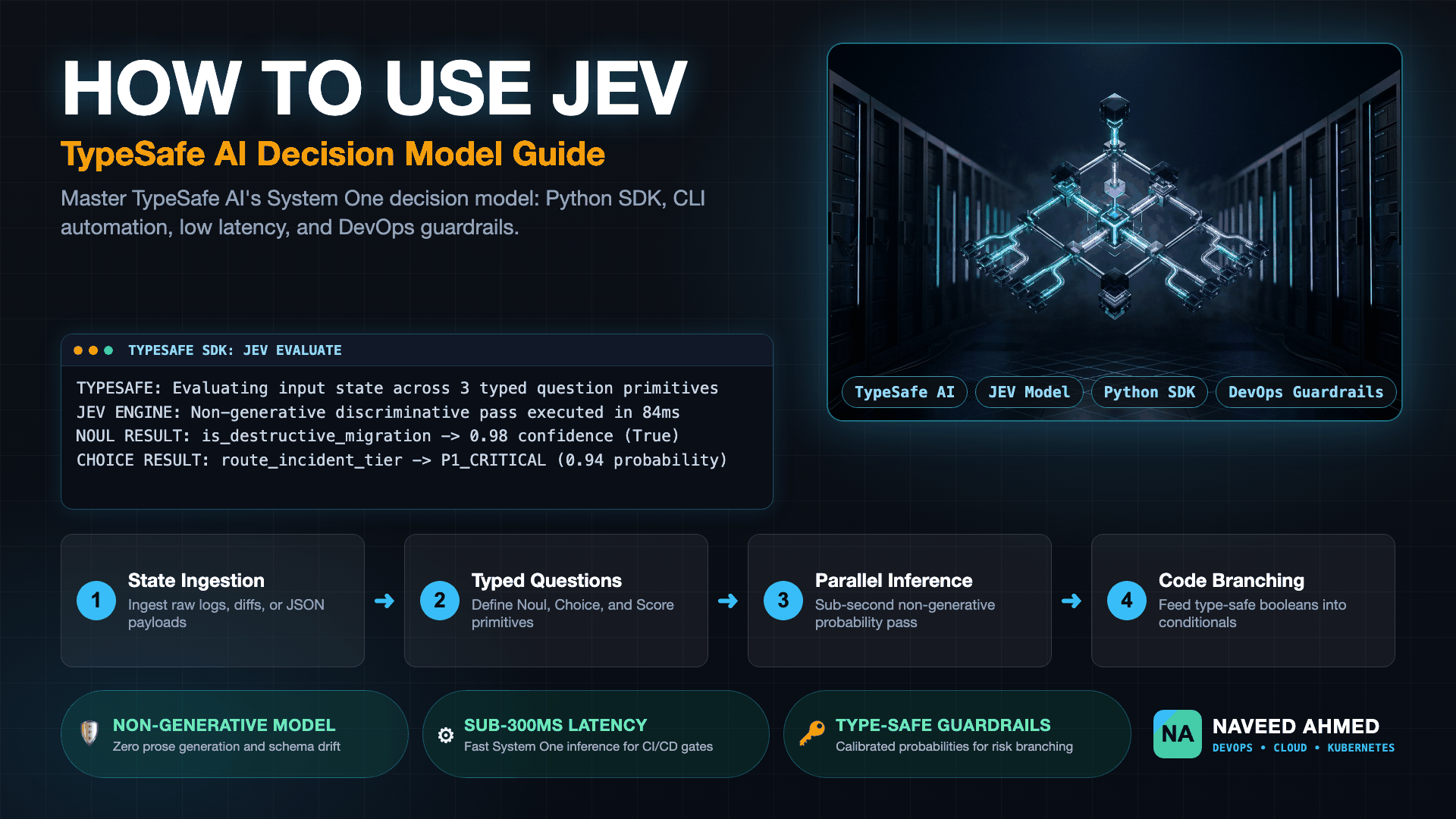
Developed by TypeSafe AI, JEV is a non-generative, System One AI decision model designed specifically for programmatic evaluation. Instead of outputting human-readable sentences, JEV evaluates an input state against strongly typed questions and returns calibrated probabilities, scores, and discrete choices within seventy to three hundred milliseconds.
In this comprehensive engineering guide, you will learn how to use JEV from foundational architecture to production deployment. We explore its System One architecture, break down all four core question primitives, walk through practical Python SDK, Pydantic AI, and CLI implementations, detail the operational benefits over generative LLMs, and demonstrate how platform teams take advantage of JEV as an automated guardrail for DevOps pipelines.
What Is JEV and How Does the TypeSafe Decision Model Work?
To master how to use JEV effectively, engineers must first understand how its architecture differs fundamentally from generative models like OpenAI GPT-4, Anthropic Claude, or Google Gemini. Traditional LLMs operate like human "System Two" reasoning: they are autoregressive, predicting one token after another sequentially. Every time you ask a generative model a yes-or-no question, it burns compute cycles and latency generating formatting syntax, markdown fences, and explanatory prose.
JEV operates on a non-generative, discriminative "System One" architecture. Instead of generating text, JEV acts like an ultra-fast, intuitive evaluation engine. You pass two distinct payloads into the API:
- State: An arbitrary block of unstructured context, such as an application stack trace, a
git diff, a Kubernetes pod event stream, a SQL database migration script, or a raw customer support ticket. - Questions: A schema of strongly typed queries defining the exact decisions your software needs to make about that state.
Rather than writing a paragraph explaining why a log looks anomalous, JEV processes the entire state in a single parallel forward pass. It computes the calibrated probability distribution across your schema and returns pure, machine-readable native data structures:
Ingest unformatted error logs, Terraform plans, or JSON payloads directly without writing complex prompt engineering templates.
Define exact decision boundaries using Noul (boolean confidence), Choice (strict enums), or Score (ordered rubrics).
Receive calibrated probabilities directly into code conditionals without schema hallucinations or JSON parsing errors.
Because JEV emits no prose tokens, it eliminates schema drift and syntax formatting failures entirely. Your application interacts with JEV not as an unpredictable conversational chatbot, but as an ultra-fast, intelligent conditional operator: an AI-driven if statement that keeps your deterministic software code completely in control.
The 970+ Incident Handbook & K8s Runbooks are exclusive to subscribers — unlock for FREE
Get battle-tested production runbooks, AWS architecture blueprints, and zero-downtime CI/CD post-mortems sent directly to your inbox. 100% free, no spam.
Core JEV Primitives: Noul, Choice, Score, and Box Explained
When adopting JEV, everything revolves around four typed question primitives. Each primitive maps directly to standard software data structures so your application code never has to parse unstructured strings:
1. The Noul Primitive (Calibrated Boolean Confidence)
The noul primitive evaluates a declarative hypothesis against your input state and returns a floating-point probability between 0.00 and 1.00 representing the model's calibrated certainty that the statement is true.
Unlike a binary true-or-false string from a standard chatbot, a calibrated probability lets engineers build risk-adjusted thresholds in production software. For example, in an automated incident script, you might automatically restart a stalled worker if confidence exceeds 0.75, while requiring human SRE approval before dropping a database lock if risk confidence sits at 0.55.
2. The Choice Primitive (Strict Categorical Classification)
The choice primitive selects the single best-fitting option from an explicit list of discrete strings. JEV calculates the normalized probability distribution across all provided choices simultaneously in one pass.
This primitive replaces fragile zero-shot classification prompts. It guarantees mathematically that the returned selection is an exact member of your defined enum or routing map, eliminating the classic production failure where an LLM invents a new category name that crashes your downstream switch statement.
3. The Score Primitive (Ordinal Rubric Evaluation)
The score primitive places an input state along an ordered scale based on explicit, non-overlapping criteria. Rather than asking a model to "rate this from 1 to 10" (which fluctuates wildly depending on wording), JEV evaluates which concrete tier of your rubric best matches the evidence in the state.
This makes score ideal for alert severity triage (Cosmetic vs. Degraded Feature vs. Critical Outage), security vulnerability grading, and pull-request blast-radius scoring before code hits production.
4. The Box Primitive (Spatial & Visual Evaluation)
For multimodal pipelines that inspect screenshots, architecture diagrams, or UI regressions, the box primitive evaluates spatial coordinates and visual bounding boxes directly against visual states. QA automation teams use it to verify whether a critical checkout button is occluded or broken without brittle pixel-diffing scripts.
Python Implementation: Integrating JEV with typesafe-sdk and Pydantic AI
Let us examine practical backend workflows using JEV. TypeSafe AI distributes the official Python SDK via PyPI as typesafe-sdk, and also supports native integration with Pydantic AI via TypeSafeModel.
First, install the library and export your API credentials:
pip install typesafe-sdk pydantic-ai
export TYPESAFE_API_KEY="ts_live_your_api_key_here"
Below is a complete, runnable Python script demonstrating how to use JEV to triage a production incident log, determine data-loss urgency, classify the root failure domain, and assign an operational severity tier in a single sub-second request:
import os
import sys
from typesafe_sdk import TypeSafeClient

def triage_production_incident(log_payload: str) -> None:
    # Initialize the TypeSafe client
    client = TypeSafeClient(
        api_key=os.environ.get("TYPESAFE_API_KEY")
    )

    # Define typed evaluation questions across Noul, Choice, and Score
    questions = {
        "is_data_loss_risk": {
            "type": "noul",
            "instructions": "The log indicates database corruption, transaction rollback failures, or permanent data loss."
        },
        "failure_domain": {
            "type": "choice",
            "options": [
                "DATABASE_CONNECTION_POOL",
                "UPSTREAM_GATEWAY_TIMEOUT",
                "OUT_OF_MEMORY_KILL",
                "AUTHENTICATION_RBAC_FAILURE",
                "TRANSIENT_NETWORK_BLIP"
            ]
        },
        "incident_severity": {
            "type": "score",
            "instructions": "Determine the operational tier of this incident.",
            "criteria": [
                "P4: Minor cosmetic error with active retry fallback",
                "P3: Non-critical background worker degraded",
                "P2: Core customer endpoint latency degraded above SLA",
                "P1: Complete service blackout or cascading infrastructure failure"
            ]
        }
    }

    try:
        # Execute sub-second System One decision evaluation
        response = client.system_one(
            model="jev-latest",
            state=log_payload,
            questions=questions
        )

        answers = response.answers

        print(f"--- JEV EVALUATION RESULT (Latency: {response.latency_ms}ms) ---")
        print(f"Data Loss Risk Probability : {answers.is_data_loss_risk.probability:.4f}")
        print(f"Identified Failure Domain  : {answers.failure_domain.selection} (Confidence: {answers.failure_domain.confidence:.2f})")
        print(f"Assigned Severity Tier     : {answers.incident_severity.tier}")

        # Execute type-safe deterministic branching in code
        if answers.is_data_loss_risk.probability > 0.85:
            print("CRITICAL ACTION: Automated safe-mode engaged. Freezing write replicas.")
        elif answers.failure_domain.selection == "DATABASE_CONNECTION_POOL":
            print("MITIGATION ACTION: Cycling connection pool workers and alerting DBA on-call.")

    except Exception as exc:
        print(f"Evaluation error: {exc}", file=sys.stderr)

if __name__ == "__main__":
    sample_crash_log = """
    2026-11-25T08:14:22Z [FATAL] postgres_pool: connection pool exhausted (max_connections=200).
    Active queries: 198 waiting on row-level lock on table 'orders_v2'.
    worker_thread_41: timeout after 30000ms waiting for available client.
    HTTP 500 returned to 4,210 checkout requests in the past 60 seconds.
    """
    triage_production_incident(sample_crash_log)
Combining JEV with Pydantic AI for Agentic Routing
When building complex multi-step workflows, developers often pair JEV (for fast System One routing) with a generative model (for System Two synthesis). Using Pydantic AI's TypeSafeModel, JEV evaluates user intent or safety constraints in under 100ms before your application ever pays the latency and token cost of invoking a large reasoning model:
from pydantic_ai import Agent
from pydantic_ai.models.typesafe import TypeSafeModel

# Fast System One guardrail agent powered by JEV
guardrail_agent = Agent(
    model=TypeSafeModel("jev-latest"),
    system_prompt="Evaluate whether the incoming payload contains prompt injection or unauthorized SQL."
)

# Only escalate to heavy generative LLM if JEV clears the request
async def process_secure_query(user_input: str) -> str:
    check = await guardrail_agent.run(user_input)
    if check.data.is_safe_probability < 0.85:
        return "Blocked by JEV TypeSafe Guardrail."
    return "Safe to forward to downstream reasoning pipeline."
Command-Line Automation: Using jev-cli and MCP Servers in CI/CD
Beyond application code, platform engineers can leverage JEV directly inside Linux terminals, bash scripts, and CI/CD runners using jev-cli. The CLI also includes a built-in Model Context Protocol (MCP) server (jev-mcp), allowing AI coding assistants to run safety checks before executing destructive commands.
Install the command-line utility via uv:
uv tool install jev-cli
jev --version
Here is an example demonstrating JEV execution inside a deployment pre-flight verification script to analyze a Terraform plan output before running terraform apply:
#!/usr/bin/env bash
set -euo pipefail

echo "==> Running Terraform Plan..."
terraform plan -no-color > tfplan.txt

echo "==> Invoking JEV to evaluate plan safety..."
JEV_RISK_PROB=$(cat tfplan.txt | jev noul \
  --statement "This plan destroys, recreates, or modifies persistent storage, production databases, or VPC routing tables." \
  --output probability)

echo "Assessed Destructive Risk Probability: ${JEV_RISK_PROB}"

# Enforce strict policy threshold (0.60)
if (( $(echo "${JEV_RISK_PROB} > 0.60" | bc -l) )); then
  echo "DEPLOYMENT HALTED: JEV detected high risk of destructive infrastructure changes (${JEV_RISK_PROB})."
  echo "Manual approval from Senior SRE team required."
  exit 1
fi

echo "JEV Verified: Plan contains only non-destructive rolling changes. Proceeding."
terraform apply -auto-approve tfplan.txt
By piping plain terminal output into jev noul, your bash scripts gain contextual understanding of complex infrastructure changes while retaining strict control over shell exit codes.
Key Benefits of JEV: Why Platform Teams Replace Generative LLMs
Why are DevOps and backend engineering teams migrating decision-heavy workloads away from traditional generative LLMs to JEV? The operational benefits stem directly from eliminating token generation overhead:
- Sub-Second Inference Latency (70ms – 300ms): Standard LLMs take 1,800ms to 6,000ms to stream text tokens sequentially. JEV executes a single parallel pass in under 300ms, making it viable for inline API gateways, CI/CD webhooks, and real-time canary routers.
- Zero Schema Hallucinations & Parsing Crashes: Generative models frequently break downstream code by wrapping JSON in markdown backticks or inventing undocumented enum values. JEV has no text generation heads and returns native types guaranteed to match your schema.
- Predictable, Token-Free Cost Scaling: Instead of paying unpredictable input-plus-output token bills while an LLM writes verbose explanations, JEV charges flat, lightweight evaluation rates per query regardless of how complex the context is.
- Calibrated Numerical Certainty: Asking a chatbot "how sure are you?" produces qualitative guesswork. JEV outputs mathematically calibrated probabilities between
0.00and1.00, enabling exact confidence thresholds in mission-critical code. - Drop-In Control Flow Integration: Responses integrate cleanly into standard Python
if/elsestatements and Linux shell exit codes without retry loops, regex scrubbers, or prompt-engineering hacks.
Real-World DevOps Use Cases: Taking Advantage of JEV in Production
Understanding how to use JEV becomes concrete when applied to high-stakes production engineering workflows. Below are three patterns where platform teams deploy JEV today:
1. Automated Canary Rollout Judging
During progressive delivery with ArgoCD sync waves and progressive hooks, static CPU thresholds often miss subtle semantic regressions—such as a microservice returning HTTP 200 with empty JSON bodies or localized serialization errors. Platform teams stream canary pod logs into JEV's noul primitive every 30 seconds. If JEV detects semantic payload degradation above a 0.80 probability, Argo Rollouts aborts the promotion automatically.
2. Pull Request Risk Gate in GitHub Actions
Senior engineers cannot manually audit every microservice PR for subtle operational hazards. By piping git diff into jev-cli inside a GitHub Action, JEV scores whether the change introduces an unindexed database migration, disables authentication middleware, or hardcodes cloud credentials. Low-risk PRs merge automatically after unit tests; high-risk PRs automatically request mandatory review from the Security or SRE group.
3. Kubernetes CrashLoopBackOff & Node Triage
When a cluster experiences cascading pod evictions, on-call engineers waste critical minutes sorting through noisy container logs. An automated event listener feeds pod logs and kubectl describe output into JEV's choice primitive to classify the failure immediately as OOMKilled, ImagePullBackOff, CNI networking exhaustion, or downstream dependency timeout before routing the PagerDuty alert to the exact owning team.
How to Effectively Use JEV as an Infrastructure Guardrail
To take full advantage of how to use JEV at enterprise scale while avoiding common pitfalls, platform architects follow three operational rules:
1. Implement Three-Tier Risk-Adjusted Branching
Never treat JEV probabilities as a simple binary coin flip. Map calibrated confidence scores into three distinct operational bands:
- Confidence < 0.40 (Safe Band): Automated execution proceeds immediately with standard audit logging.
- Confidence 0.40 – 0.80 (Advisory Band): Allow non-destructive deployments to continue, but dispatch an asynchronous warning to the engineering Slack channel for post-deploy review.
- Confidence > 0.80 (Block Band): Hard-stop the pipeline, preserve diagnostic state snapshots, and require explicit human SRE sign-off before proceeding.
2. Pair JEV with Deterministic Linters and Policy Engines
JEV does not replace deterministic static analysis; it augments it. Continue running strict schema tools like our Kubernetes YAML Validator and OPA Gatekeeper for syntax and policy verification. Reserve JEV for contextual semantic judgments that static AST parsers cannot evaluate, such as verifying whether release notes align with observed cluster side effects.
3. Know When NOT to Use JEV (Anti-Patterns)
Because JEV is a non-generative System One engine, do not use it for tasks requiring open-ended synthesis. It cannot draft documentation, write multi-file Python applications, summarize long PDFs into essays, or hold interactive customer support conversations. Use JEV strictly for fast classification, scoring, and gating, and pair it with proven operational blueprints from our DevOps Roadmap and industry analyses like our report on Jensen Huang's leadership return at NVIDIA.
- Right Tool for the Job: Deploy JEV for fast, deterministic decisions (70–300ms), never for open-ended prose generation.
- Master All Primitives: Combine
noulfor boolean confidence,choicefor strict enum routing, andscorefor rubric grading. - Automate Safely: Use
typesafe-sdkin Python services andjev-cliin CI/CD shell gates to block destructive Terraform plans or bad canary rollouts. - Calibrate Your Thresholds: Leverage floating-point confidence bands to balance developer velocity with strict production safety.
By moving decision logic out of fragile generative prompt wrappers and into TypeSafe AI's System One engine, engineering organizations achieve the sub-second latency, schema certainty, and operational resilience that modern cloud infrastructure demands.
Frequently Asked Questions
Direct answers to frequent engineering questions regarding AI coding agent disruptions, entry-level career outlooks, computer science degree value, and the changing landscape of software development roles in production environments.
What is JEV and how does it differ from generative LLMs?
JEV is a non-generative System One AI decision model built by TypeSafe AI. Unlike standard Large Language Models (LLMs) that stream conversational text tokens sequentially, JEV evaluates an input state against typed questions and returns calibrated probabilities, scores, or categorical choices in 70 to 300 milliseconds without producing prose.
How to use JEV in Python applications?
To use JEV in Python, install the official SDK via pip install typesafe-sdk. Initialize the TypeSafeClient with your API key, define your input state (such as an error log or JSON payload), and specify typed questions using noul (boolean), choice, or score primitives.
What are the core question primitives in JEV?
JEV features three primary question primitives: Noul (evaluates yes/no questions returning calibrated confidence probabilities between 0.0 and 1.0), Choice (selects from discrete categories with normalized probability distribution), and Score (evaluates inputs against an ordered multi-tier rubric).
How to use JEV CLI for DevOps pipelines?
Install jev-cli using uv tool install jev-cli or brew. In shell scripts and CI/CD pipelines, pipe error logs or infrastructure states directly into jev evaluate to retrieve machine-readable JSON outputs or map confidence scores directly to exit codes for automated build breaks or canary rollbacks.
What are the main benefits of JEV for infrastructure and software engineering?
The primary benefits of JEV include sub-second decision latency (70-300ms), deterministic type safety with zero formatting hallucinations, predictable pricing without token generation overhead, and seamless integration into automated guardrails for Kubernetes deployments, Terraform plans, and incident response.