This caddy web server tutorial provides a comprehensive, production-ready guide to deploying, configuring, and hardening Caddy v2 across modern cloud environments. Engineering teams deploying edge infrastructure face a recurring operational headache: maintaining brittle Certbot cron jobs, debugging arcane Nginx configuration blocks, and monitoring memory safety vulnerabilities in legacy C codebases. Here you will learn how to configure, deploy, and harden Caddy—a modern, memory-safe web server and reverse proxy written in Go that provides enterprise-grade automatic TLS, native HTTP/3, and dynamic JSON API reconfiguration out of the box.
Caddy Web Server Tutorial: Architecture and Core Concepts
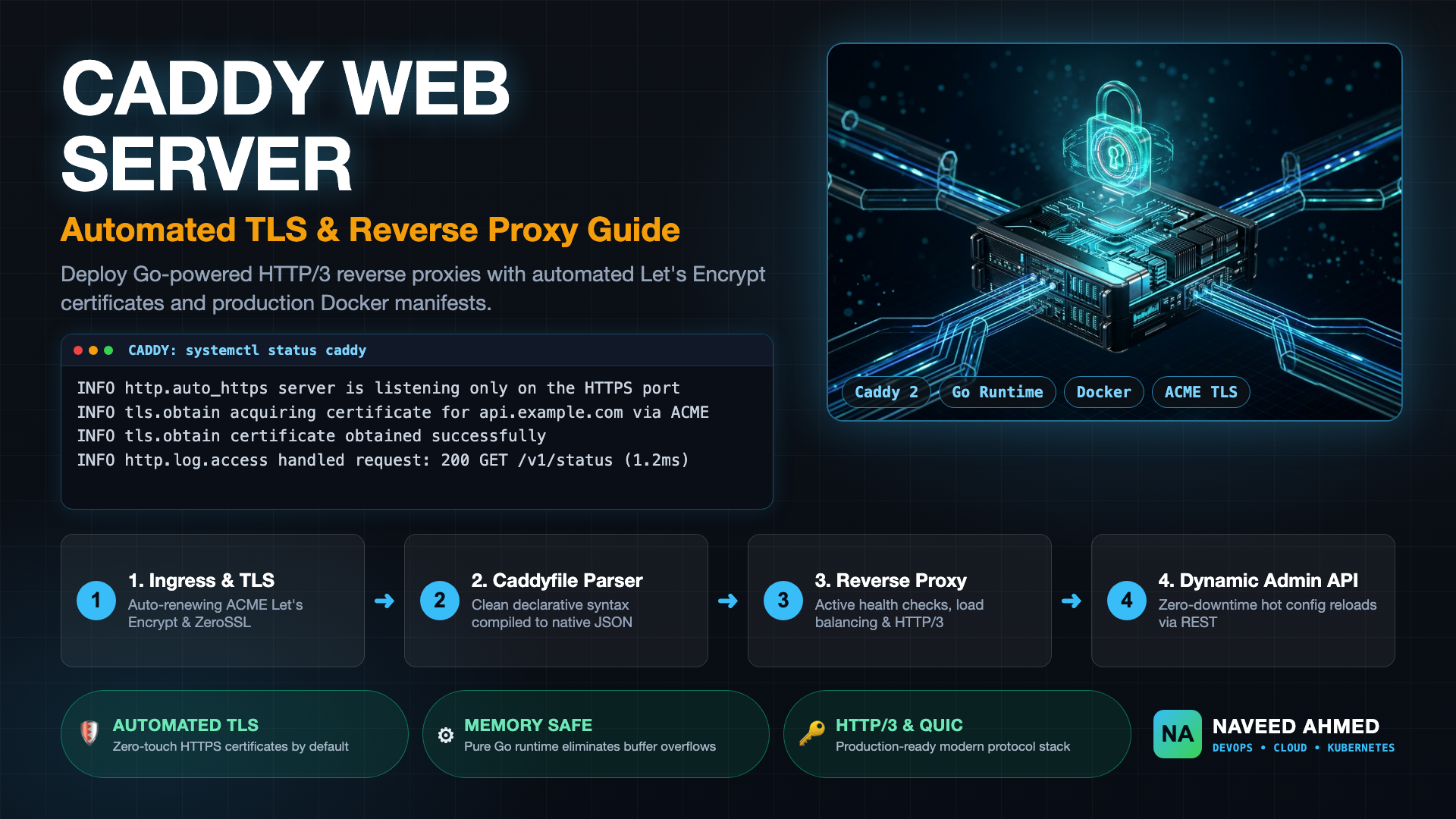
Caddy is an enterprise-grade, open-source reverse proxy and web server written in Go. Unlike traditional C-based servers, Caddy provides built-in automated TLS issuance via Let's Encrypt and ZeroSSL, native HTTP/3 QUIC support, a human-friendly Caddyfile syntax, and a zero-downtime dynamic REST configuration API running on localhost:2019.
When engineers ask what is caddy web server and what it is primarily used for in modern cloud architecture, the answer spans three core infrastructure layers: edge ingress proxying, internal microservice load balancing, and high-performance static asset delivery. While legacy tools like Apache HTTP Server and Nginx were architected during the early 2000s when TLS was an expensive manual afterthought, Caddy was designed natively for the encrypted-by-default Internet.
The core engine—often referred to in the developer community as the caddy go web server or caddy 2 webserver—replaces monolithic process models with modular Go goroutines. At its heart, Caddy consists of three distinct operational subsystems:
1. Dynamic JSON Engine
Caddy's native internal configuration is purely structured JSON. An administrative REST API exposed on localhost:2019 allows operators or orchestrators to push atomic configuration changes without restarting the daemon, dropping active client connections, or parsing text files on disk.
2. Caddyfile Adapter
For human operators, Caddy provides the Caddyfile—an intuitive, concise configuration format. Behind the scenes, the Caddyfile adapter parses your declarative directives and transpiles them into Caddy's native JSON representation before loading it into memory.
3. Automatic HTTPS Subsystem
Caddy's TLS subsystem autonomously requests, installs, and renews X.509 certificates from Let's Encrypt or ZeroSSL. It manages ACME HTTP-01, TLS-ALPN-01, and DNS-01 challenges, rotates expiring keys, staples OCSP responses, and enforces HTTP-to-HTTPS redirects automatically.
Because the source code is hosted publicly on caddy github under the permissive Apache 2.0 license, teams often question: is caddy free? Yes, Caddy is 100% free open-source software for both personal and enterprise production environments, maintained by an active global community and commercial backing from StackPath and ZeroSSL.
In high-velocity Kubernetes clusters or ephemeral staging platforms, updating Nginx requires modifying a ConfigMap and issuing a SIGHUP reload signal, which can temporarily leak worker process memory under heavy concurrency. Caddy allows your CI/CD pipelines to patch routing tables directly over HTTP: POST /config/apps/http/servers/srv0/routes with instant, non-blocking execution.
The 970+ Incident Handbook & K8s Runbooks are exclusive to subscribers — unlock for FREE
Get battle-tested production runbooks, AWS architecture blueprints, and zero-downtime CI/CD post-mortems sent directly to your inbox. 100% free, no spam.
Caddy vs Nginx vs Apache: The Production Comparison
While Nginx and Apache maintain massive historical adoption and marginal throughput advantages under extreme synthetic workloads, Caddy provides superior operational efficiency, native memory safety, and out-of-the-box automated TLS that eliminates third-party renewal scripts and eliminates whole classes of memory corruption exploits.
When evaluating caddy vs nginx and caddy web server vs apache for mission-critical deployments, engineering leads must weigh raw synthetic benchmarking against real-world developer productivity and infrastructure maintenance costs.
| Architectural Dimension | Caddy Web Server (v2) | NGINX Open Source | Apache HTTP Server (httpd) |
|---|---|---|---|
| Core Language & Runtime | Go (Garbage Collected, Goroutines) | C (Event-driven, Master/Worker) | C (Multi-Processing Modules: Event/Worker/Prefork) |
| Memory Safety | High (Eliminates buffer overflows & pointer corruption) | Manual (Susceptible to C memory bugs & CVEs) | Manual (Susceptible to C memory bugs & CVEs) |
| Automated TLS / ACME | Built-in native client (Zero-config Let's Encrypt / ZeroSSL) | External sidecar required (Certbot cron / acme.sh) | Requires mod_md module or external cron scripts |
| HTTP/3 & QUIC Support | Enabled natively by default | Requires separate nginx-quic packages and tuning |
Experimental via external modules |
| Configuration Engine | Dual: Declarative Caddyfile & Dynamic JSON REST API | Static Nginx DSL text files | Static httpd.conf & .htaccess directives |
| Zero-Downtime Reloads | In-process atomic configuration swaps via API / CLI | Master process forks new workers via SIGHUP |
Graceful process restart via apachectl graceful |
| Production Suitability | Modern cloud-native, microservices, dynamic edge | High-concurrency static edge, 100Gbps caching tiers | Legacy PHP/LAMP stacks, enterprise modules |
In Kubernetes environments where TLS automation is typically offloaded to external controllers, contrast this approach with our production runbook on Kubernetes Ingress-NGINX and Cert-Manager automated SSL, where maintaining CRDs and ACME issuers introduces significant operational overhead compared to Caddy's single-binary integration.
Security Analysis: Is Caddy Safe and Free from Vulnerabilities?
Caddy is inherently safer than traditional C-based web servers due to Go's type-safe, memory-managed runtime, which eliminates buffer overflows, double frees, and pointer corruption. Production hardening requires binding via Linux capabilities, running as an unprivileged user, and restricting administrative API listeners.
Security officers evaluating enterprise adoption frequently ask: is caddy safe, and what does the historical landscape of caddy web server vulnerabilities and exploits look like? In legacy web servers written in C (such as Nginx and Apache), the majority of critical Common Vulnerabilities and Exposures (CVEs) stem from memory management defects: integer overflows, buffer over-reads, heap corruption, and arbitrary code execution triggered by malformed HTTP request headers.
Because Caddy is compiled entirely in Go, it provides strong memory safety protections:
- Elimination of Buffer Overflows: Go's memory-safe array slicing and bounds checking prevent remote threat actors from executing arbitrary shellcode through memory buffer overruns.
- Cryptographic Rigor: Caddy leverages Go's standard
crypto/tlslibrary, vetted by world-class cryptographic researchers, avoiding the historical memory leakage bugs seen in custom OpenSSL bindings. - Safe TLS Defaults: By default, Caddy disables obsolete protocols (SSLv3, TLS 1.0, TLS 1.1) and enforces modern, forward-secret cipher suites (ECDHE-ECDSA-AES128-GCM-SHA256, ChaCha20-Poly1305) with automated OCSP stapling.
To understand the broader threat landscape of perimeter infrastructure and zero-day memory exploitation, review our technical breakdown of Black October vulnerabilities and perimeter security flaws.
The Caddy admin API running on localhost:2019 allows complete server reconfiguration. In production, never bind this port to public network interfaces (0.0.0.0:2019) without mutual TLS or IP restriction. If you do not require runtime dynamic API mutations, disable the endpoint entirely in your Caddyfile global options: { admin off }.
Hands-On Caddy Web Server Tutorial: Setup Across Linux, Windows, and Docker
Installing Caddy requires either downloading a single standalone static binary or using official package repositories across Linux, Windows, and macOS. For extended production capabilities like DNS-01 verification plugins, xcaddy builds custom binaries without external build dependencies.
Executing this hands-on caddy web server tutorial setup takes only minutes because Caddy compiles to a statically linked binary with no shared library dependencies. Below are the verified installation steps for primary enterprise operating systems.
Installing on Debian, Ubuntu, and Linux Distributions
# Install official repository signing key and source list
sudo apt-get install -y debian-keyring debian-archive-keyring apt-transport-https curl
curl -1sLF 'https://dl.cloudsmith.io/public/caddy/stable/gpg.key' | sudo gpg --dearmor -o /usr/share/keyrings/caddy-stable-archive-keyring.gpg
curl -1sLF 'https://dl.cloudsmith.io/public/caddy/stable/debian.deb.txt' | sudo tee /etc/apt/sources.list.d/caddy-stable.list

# Update package index and install caddy
sudo apt-get update
sudo apt-get install -y caddy

# Verify installed binary version and systemd status
caddy version
sudo systemctl status caddy --no-pager
The standard distribution automatically registers a systemd unit running as the unprivileged caddy user, configured with Linux capabilities to bind ports 80 and 443 without root privileges:
v2.8.4 h1:gz8r3... (built with go1.22.x)
● caddy.service - Caddy
     Loaded: loaded (/lib/systemd/system/caddy.service; enabled; vendor preset: enabled)
     Active: active (running) since Mon 2026-10-26 14:15:22 UTC; 12s ago
   Main PID: 28412 (caddy)
     Tasks: 8 (limit: 4684)
     Memory: 22.4M
     CGroup: /system.slice/caddy.service
             └─28412 /usr/bin/caddy run --environ --config /etc/caddy/Caddyfile
Running on Windows Environments
For operators managing caddy web server windows environments, Caddy can be installed via Chocolatey, Scoop, or downloaded directly from official releases:
# Install via Scoop package manager
scoop install caddy

# Or install via Chocolatey
choco install caddy

# Validate Caddy run on Windows PowerShell
caddy.exe run --config C:\caddy\Caddyfile
Windows administrators can easily register Caddy as a persistent background service using the Windows Service Control utility or NSSM (Non-Sucking Service Manager), making it ideal for internal enterprise intranet proxies and staging environments.
Building Custom Plugins with xcaddy
If your architecture requires custom caddy web server plugins (for example, non-standard DNS providers like Cloudflare, AWS Route 53, or dynamic rate-limiting modules), use Caddy's official build tool, xcaddy:
# Install xcaddy CLI
go install github.com/caddyserver/xcaddy/cmd/xcaddy@latest

# Compile custom Caddy binary with Cloudflare DNS-01 provider
xcaddy build \
    --with github.com/caddy-dns/cloudflare \
    --with github.com/mholt/caddy-ratelimit

# Output binary replaces /usr/bin/caddy
sudo cp ./caddy /usr/bin/caddy
sudo systemctl restart caddy
The Caddyfile Masterclass: Production Reverse Proxy and Automated TLS
The Caddyfile simplifies reverse proxying, load balancing, header manipulation, and compression into a concise declarative block. Caddy automatically provisions TLS certificates for valid hostnames, negotiates HTTP/3, and performs health checks against upstream targets.
In this operational walkthrough of our caddy web server tutorial, we configure a production-ready Caddyfile. Unlike Nginx configuration files that span dozens of nested location and proxy_pass blocks, a production-ready Caddyfile handles complex reverse proxy routing in under twenty lines.
Production Reverse Proxy Caddyfile Example
Below is a production configuration for an API gateway serving api.example.com, routing traffic across multiple containerized upstream instances with active health checks, compression, and security headers:
{
    # Global options block
    email ops@example.com
    admin localhost:2019
    log {
        output file /var/log/caddy/access.log {
            roll_size 100mb
            roll_keep 5
            roll_keep_for 720h
        }
        format json
    }
}

api.example.com {
    # Automatic TLS is provisioned transparently for this domain
    encode zstd gzip

    # Strict security headers
    header {
        Strict-Transport-Security "max-age=31536000; includeSubDomains; preload"
        X-Content-Type-Options "nosniff"
        X-Frame-Options "DENY"
        Referrer-Policy "strict-origin-when-cross-origin"
        -Server
    }

    # High-performance reverse proxy with round-robin load balancing
    reverse_proxy 10.0.1.10:8080 10.0.1.11:8080 {
        lb_policy round_robin
        lb_try_duration 2s
        lb_try_interval 250ms

        # Active health checks
        health_uri /healthz
        health_interval 5s
        health_timeout 2s
        health_status 200

        # Upstream proxy headers
        header_up Host {upstream_hostport}
        header_up X-Real-IP {remote_host}
        header_up X-Forwarded-For {remote_host}
        header_up X-Forwarded-Proto {scheme}
    }
}
To inspect and validate structured Caddy configurations or test the JSON output emitted by Caddy's dynamic translation engine, developers can leverage our web-based JSON Formatter and Validator tool.
Wildcard Certificates with DNS-01 Challenges
When hosting internal staging environments or multiple dynamic subdomains (e.g., *.staging.example.com), HTTP-01 challenges will fail because the ACME server cannot query individual internal hosts. Using a DNS plugin compiled via xcaddy, Caddy updates DNS TXT records automatically:
*.staging.example.com {
    tls {
        dns cloudflare {env.CLOUDFLARE_API_TOKEN}
    }

    reverse_proxy internal-gateway.staging.svc:8080
}
Containerizing Caddy: Production Docker and Compose Guide
Deploying Caddy with Docker requires persisting two critical directories: /data for issued TLS certificates and ACME account keys, and /config for stored runtime configurations. Omitting persistent volumes causes certificate rate-limiting and data loss on container recreation.
Building on our practical caddy web server tutorial, let us containerize Caddy with Docker Compose. When running caddy docker or caddy web server docker workloads, engineers frequently overlook state management. Because Caddy acquires certificates dynamically from Let's Encrypt, failing to mount persistent storage will wipe the certificates every time a container restarts, quickly triggering Let's Encrypt's weekly duplicate certificate rate limit (5 duplicate certificates per week).
Production Docker Compose Architecture
Here is an enterprise-grade compose.yaml demonstrating Caddy orchestrating traffic to an upstream Go microservice:
version: "3.8"

services:
  caddy:
    image: caddy:2.8.4-alpine
    container_name: production_edge_caddy
    restart: unless-stopped
    ports:
      - "80:80"
      - "443:443"
      - "443:443/udp" # Required for native HTTP/3 QUIC support
    environment:
      - DOMAIN=app.example.com
      - UPSTREAM=api_backend:8080
    volumes:
      - ./Caddyfile:/etc/caddy/Caddyfile:ro
      - caddy_data:/data      # CRITICAL: Stores ACME certificates and private keys
      - caddy_config:/config  # Stores dynamic configuration state
    ulimits:
      nofile:
        soft: 65536
        hard: 65536
    networks:
      - edge_net
    healthcheck:
      test: ["CMD", "caddy", "status"]
      interval: 10s
      timeout: 3s
      retries: 3

  api_backend:
    image: my-app-service:v1.4.2
    container_name: production_api_backend
    restart: unless-stopped
    expose:
      - "8080"
    networks:
      - edge_net

volumes:
  caddy_data:
    name: production_caddy_data
  caddy_config:
    name: production_caddy_config

networks:
  edge_net:
    driver: bridge
Notice the ulimits configuration in the Compose manifest above. Under high socket concurrency, edge proxies can rapidly exhaust the default container open file limits. For in-depth diagnostic procedures on handling file descriptor bottlenecks under heavy reverse proxy workloads, review our technical interview breakdown on Docker ulimit open files exhaustion and proxy fixes.
Production Triage: Common Failure Modes and Runbook
Production issues with Caddy typically involve Let's Encrypt rate limits, permission denied socket binding, missing volume mounts, or backend upstream dial timeouts. Systematic triage begins with caddy validate followed by reviewing structured JSON logs.
When operating Caddy at scale, use this operational troubleshooting matrix to rapidly isolate and remediate incidents:
| Observed Symptom | Probable Root Cause | Immediate Diagnostic Command | Resolution Procedure |
|---|---|---|---|
429 Too Many Requests during TLS handshake |
Exceeded Let's Encrypt rate limits due to ephemeral container restarts without volume persistence | caddy validate --config Caddyfile |
Temporarily switch to Let's Encrypt Staging CA (ca https://acme-staging-v02.api.letsencrypt.org/directory) and verify caddy_data volume mounts. |
bind: permission denied on startup |
Caddy process lacks permission to bind privileged ports (< 1024) when running as non-root | getcap /usr/bin/caddy |
Grant capability: sudo setcap 'cap_net_bind_service=+ep' /usr/bin/caddy. |
502 Bad Gateway returned to clients |
Upstream service unreachable, socket refused, or DNS resolution failure within private network | curl -v http://<upstream_ip>:<port>/healthz |
Verify upstream container health, inspect Docker network bridging, and check Caddy logs for dial tcp: connection refused. |
| Changes to Caddyfile not taking effect | Daemon was started in dynamic JSON mode, or reload command was omitted | caddy reload --config /etc/caddy/Caddyfile |
Execute caddy reload to push changes to the active memory space, or check systemd logs with journalctl -u caddy -e. |
| HTTP/3 QUIC connection refused | UDP port 443 blocked by cloud security group or host firewall (e.g. AWS Security Group / iptables) | nc -uvz <server-ip> 443 |
Open inbound UDP 443 in firewall rules; ensure Docker container forwards "443:443/udp". |
Before executing a reload on a live production node, always validate the syntax to prevent invalid configs from interrupting active worker routines: caddy validate --config /etc/caddy/Caddyfile. If valid, reload gracefully: caddy reload --config /etc/caddy/Caddyfile.
Conclusion: Key Architectural Takeaways and Migration Path
Adopting Caddy as your primary edge reverse proxy represents a paradigm shift from manual infrastructure configuration to resilient automation. By following this caddy web server tutorial, you have gained an actionable blueprint to replace fragile external ACME scripts, harden production containers against memory safety vulnerabilities, and streamline reverse proxy routing across your microservices.
- Automated TLS by Default: Eliminate manual certificate renewals, expired certificate outages, and complex cron jobs with Caddy's built-in ACME automation.
- Memory-Safe Security Posture: By running on Go's type-safe, garbage-collected runtime, Caddy eradicates classical C pointer exploits and buffer overflow attack vectors.
- Unified Operations: Combine the human readability of the declarative Caddyfile with the dynamic automation of a RESTful configuration API.
- Modern Protocol Ready: Deliver immediate user-facing latency reductions with out-of-the-box HTTP/3, QUIC, and modern compression algorithms.
As you plan your migration from legacy Nginx or Apache architectures, begin by deploying Caddy in non-critical staging environments or containerized internal microservices. Mount persistent named volumes for TLS state, validate configurations prior to reloading, and embrace the operational velocity of modern, memory-safe edge infrastructure.
Frequently Asked Questions
What is Caddy web server and what is it used for?
Caddy is an enterprise-ready, open-source web server and reverse proxy written in Go. It is primarily used to terminate TLS automatically, route traffic to backend microservices, serve static websites, balance loads with active health checks, and serve modern protocols such as HTTP/3 and QUIC without external certificate managers.
Is Caddy web server completely free and open source?
Yes. Caddy 2 is fully open source and free for commercial and personal use under the Apache 2.0 license. The official source code is maintained on GitHub (caddyserver/caddy), and all standard distribution binaries can be downloaded and deployed freely without licensing fees.
Is Caddy web server safe and how does it prevent vulnerabilities?
Caddy is memory-safe because it is written in Go, which eliminates entire classes of vulnerabilities common in C-based servers like Nginx and Apache, such as buffer overflows, use-after-free exploits, and pointer corruption. Caddy also defaults to strict TLS 1.3/1.2 cipher suites, automated OCSP stapling, and non-root execution.
How does Caddy compare to Nginx and Apache in production?
While Nginx and Apache have historical dominance and raw epoll throughput advantages at ultra-high concurrent static connections, Caddy excels in operational velocity. Caddy automates SSL/TLS provisioning natively, offers human-readable Caddyfile syntax alongside a dynamic REST API for hot-reloads, and natively supports HTTP/3.
Can Caddy web server run on Windows and Docker?
Yes. Caddy is cross-platform and compiles to a single static binary. It runs natively on Windows (as a standalone executable or Windows Service), Linux, macOS, and in Docker. The official Docker image ('caddy:alpine') provides a lightweight container footprint for containerized microservices.