1. The Startup Infrastructure Paradox: Click-Ops vs Over-Engineering
Every founding engineer or early DevOps hire falls into one of two dangerous traps when setting up their first AWS environment:
- Trap A: Fragile Click-Ops. The solo founder opens the AWS Console at midnight, creates an EC2 instance with public IP in the default VPC, generates a root access key, drops it into GitHub Secrets, and SSHs into the machine to run
git pull && docker-compose up -d. It works for 3 weeks—until SOC2 auditor questionnaires arrive, an engineer accidentally deletes a security group, or an API key leaks to a public repository. - Trap B: Kubernetes Resume-Driven Over-Engineering. The senior hire tries to replicate a FAANG platform: provisions an Amazon EKS cluster with 3 control plane endpoints ($73/mo), 3 multi-AZ NAT Gateways ($97.20/mo), Karpenter, ArgoCD, Prometheus, Grafana, and Istio service mesh. Before shipping a single customer feature or recording the first user signup, the AWS bill is sitting at $900/month, and the team spends 80% of their sprints debugging Kubernetes CNI IP exhaustion.
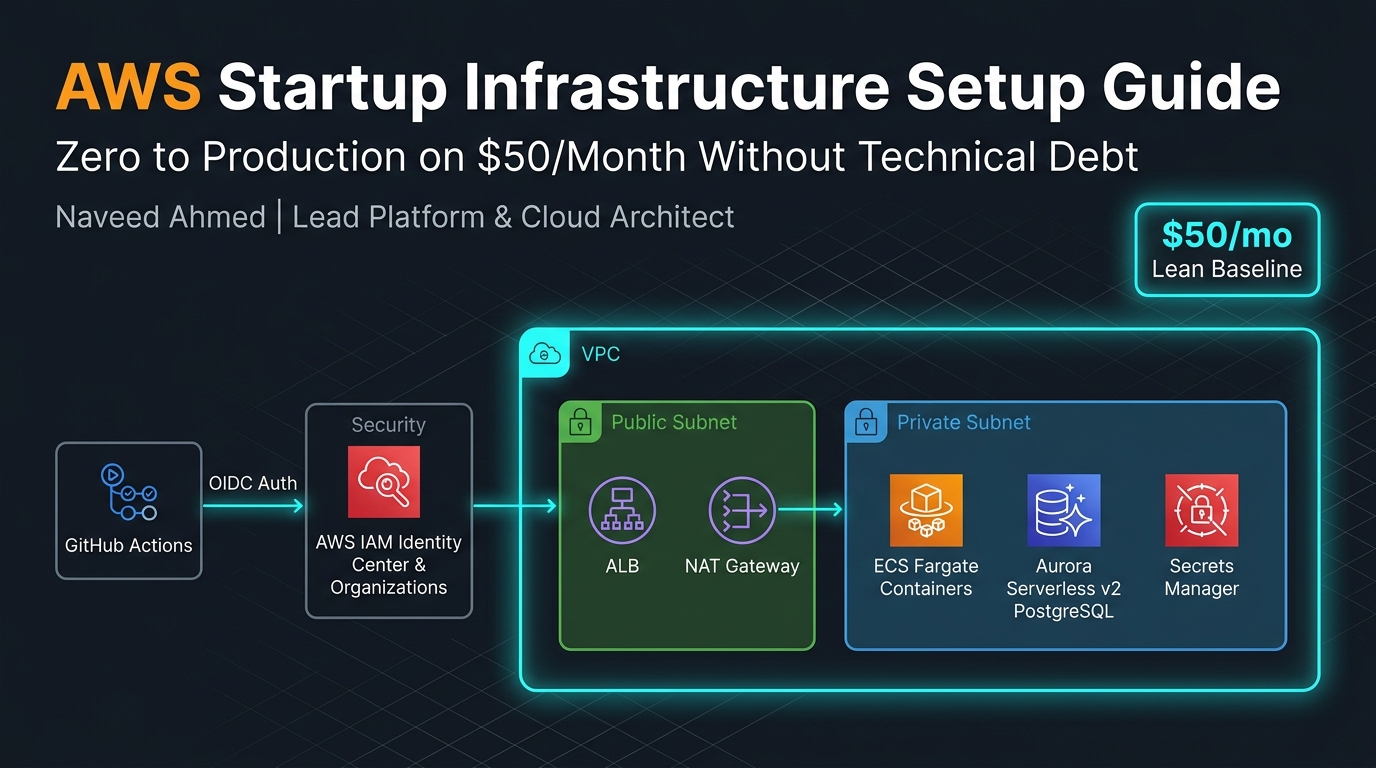
There is an elegant third way: **The $50/Month Lean Production Baseline**. It provides rock-solid security (zero hardcoded access keys, strict multi-account isolation), declarative Infrastructure as Code via Terraform, zero server management, and automated rollbacks—costing less than a nice team lunch.
| Architecture Layer | The Click-Ops Trap | The Over-Engineered Trap | The $50/mo Lean Baseline |
|---|---|---|---|
| Account Strategy | Single root account Fatal Risk | 12 AWS accounts + Control Tower | 3-Account Org (Root, Dev, Prod) |
| Networking | Default VPC, Public EC2 | Transit Gateway + 3 NAT GWs ($120/mo) | Multi-AZ VPC + Free S3 Endpoints ($3.50/mo) |
| Compute Engine | Bare EC2 t3.medium ($30/mo) | Amazon EKS Cluster ($280/mo) | ECS Fargate / App Runner ($22/mo) |
| Database | Postgres inside Docker on EC2 | Multi-AZ Aurora Cluster ($180/mo) | Aurora Serverless v2 (0.5 ACU) ($25/mo) |
| CI/CD Auth | Long-lived IAM Access Keys Leak Risk | Self-hosted GitHub Runners in EKS | GitHub Actions OIDC (Zero Keys) |
The 970+ Incident Handbook & K8s Runbooks are exclusive to subscribers — unlock for FREE
Get battle-tested production runbooks, AWS architecture blueprints, and zero-downtime CI/CD post-mortems sent directly to your inbox. 100% free, no spam.
2. Account Topology: AWS Organizations & IAM Identity Center from Day 1
The single biggest architectural regret startup founders confess at Series A is having development, staging, and production crammed into a single AWS account. When a junior developer runs a cleanup script in "dev" and accidentally purges a production S3 bucket or modifies a shared security group, your business stops.
Setting up AWS Organizations takes 15 minutes and is 100% free. Create three accounts within your organization:
- Management / Root Account: Houses billing, Consolidated Invoicing, AWS Organizations policies (SCPs), and AWS IAM Identity Center (SSO). Zero workloads, zero EC2 instances, and zero databases run here.
- Development / Staging Account: Playground for engineering iterations, preview environments, automated integration tests, and sandbox experiments.
- Production Account: Isolated fortress for customer data, production databases, container tasks, and TLS certificates. Developers have read-only access; deployments happen exclusively through automated CI/CD pipelines.
Immediately lock the root email account. Enable hardware MFA (YubiKey or Passkey), delete any root access keys (they should never exist), and configure a complex 32-character random password locked in 1Password. Never use the root account for daily work.
Eliminating Static IAM Users with IAM Identity Center (SSO)
Never create IAM users (e.g., alice, bob) with permanent passwords or access keys in the AWS console. Enable **AWS IAM Identity Center** in your Management account. Connect it to Google Workspace or your identity provider, and assign permission sets:
AdministratorAccess: Assigned only to the CTO/Lead DevOps for emergency break-glass sessions.ViewOnlyAccess/SupportUser: For engineering triage in Production.PowerUserAccess: For developers in the Development account.
3. Minimal Multi-AZ VPC Design (Without the NAT Gateway Tax)
Networking is where AWS stealthily taxes founders who don't read the fine print. When you click "Create VPC with 3 Public and 3 Private Subnets" in the AWS management console, AWS silently provisions 3 NAT Gateways.
Each AWS NAT Gateway charges $0.045 per hour (~$32.40/month) plus $0.045 per gigabyte transferred. Three NAT Gateways cost $97.20/month before your application has served its first HTTP request!
For an early-stage startup, follow this lean multi-AZ VPC layout:
- VPC CIDR:
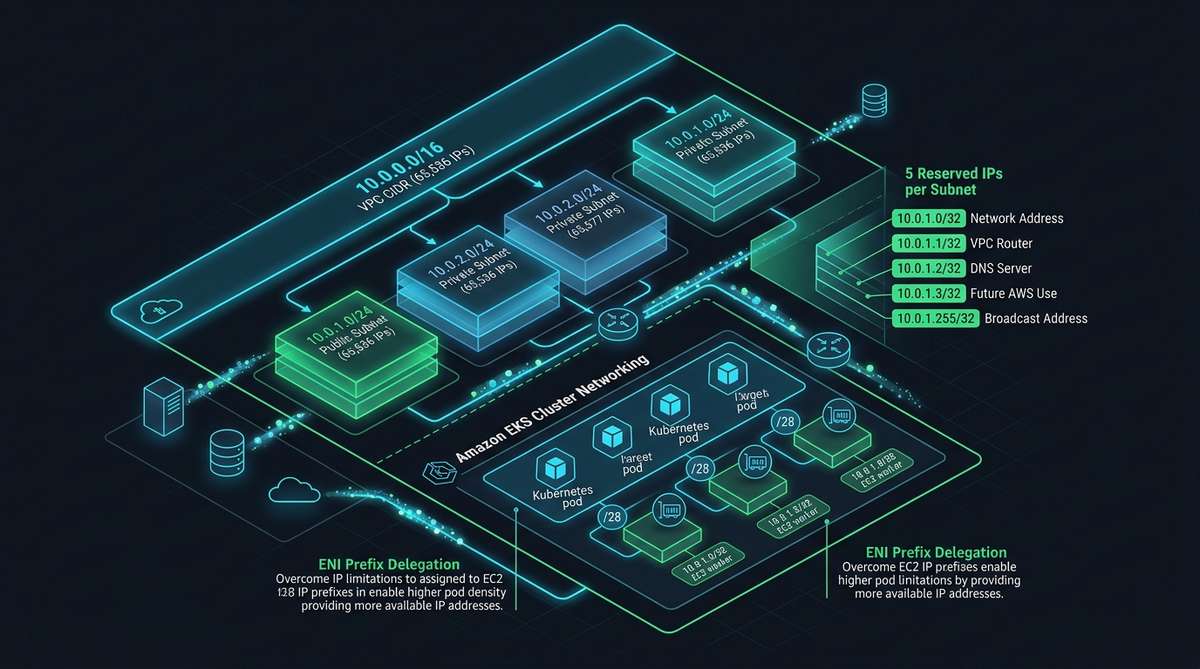
10.0.0.0/16(provides 65,536 IPs, leaving room for future VPC peering or Transit Gateways). If you're designing subnets, refer to our AWS Subnetting & CIDR Architecture Guide. - Availability Zones: 2 AZs (e.g.,
us-east-1aandus-east-1b). This provides 99.99% infrastructure SLA for ALBs and Aurora without 3-AZ complexity. - Public Subnets (2x /24): Houses only your Application Load Balancer (ALB) and public-facing endpoints.
- Private Subnets (2x /20): Houses your ECS Fargate container tasks, workers, and background queues. No public IPs assigned.
- Database Subnets (2x /24): Isolated private subnets strictly dedicated to Aurora PostgreSQL. No internet gateway routing.
How to Bypass the NAT Gateway Bill Shock
Your private containers need outbound internet access to pull third-party API dependencies (Stripe, OpenAI, SendGrid) and npm/pip packages during startup. Here are the two techniques that reduce networking costs by 90%:
- Gateway VPC Endpoints for Amazon S3 & DynamoDB: Gateway endpoints are completely free. When your containers pull images from ECR or write data to S3, traffic routes directly across the AWS backbone rather than through a paid NAT Gateway.
- The $3.50/mo NAT Instance (fck-nat): In Development and early Production, run a tiny
t4g.nanoGraviton instance ($0.0042/hr = $3.02/month) running open-sourcefck-natwith source/dest check disabled. It routes outbound packets at line rate up to 5 Gbps without the $32/mo managed fee.
# Terraform snippet: Free Gateway VPC Endpoint for S3
resource "aws_vpc_endpoint" "s3" {
  vpc_id          = aws_vpc.main.id
  service_name    = "com.amazonaws.us-east-1.s3"
  vpc_endpoint_type = "Gateway"
  route_table_ids = [aws_route_table.private.id]

  tags = {
    Name        = "vpce-s3-gateway"
    Environment = "production"
  }
}
4. Compute Velocity: Why You Shouldn't Run EKS at Seed Stage
Unless your core product is an infrastructure security scanner or multi-tenant agent sandbox that requires custom Kubernetes CRDs, **do not deploy Kubernetes (Amazon EKS) on Day 1**.
Managing Kubernetes requires continuous maintenance: patching control planes every 14 months, managing VPC CNI IP pool allocation, upgrading deprecated API versions, and tuning DaemonSets. For a team of 3 engineers, this is an unacceptable distraction from talking to customers and shipping code.
The 2 Best Compute Choices for Startups: App Runner vs ECS Fargate
| Feature | AWS App Runner | Amazon ECS Fargate | Amazon EKS (Kubernetes) |
|---|---|---|---|
| Setup Time | 15 Minutes (Instant) | 2–4 Hours (Terraform) | 2–5 Days (Complex) |
| Fixed Monthly Cost | $0 base (scales to zero) | ~$18–$25 / task (24/7) | $73/mo control plane + nodes |
| VPC & DB Connectivity | VPC Connector required | Native ENI inside Private Subnet | VPC CNI / Prefix Delegation |
| Background Workers | Limited to HTTP APIs | Native SQS/EventBridge workers | KEDA autoscaled pods |
| Best For | Solo founder, Next.js / FastAPI | Seed/Series A microservices | Platform teams with 5+ DevOps |
For full control without server maintenance, **Amazon ECS on AWS Fargate** is the gold standard. Here is the lean production Terraform configuration for an ECS Service running behind an Application Load Balancer with zero EC2 instances to patch:
# Production ECS Task Definition on AWS Fargate (0.25 vCPU, 512 MB RAM)
resource "aws_ecs_task_definition" "api" {
  family                   = "startup-api"
  network_mode             = "awsvpc"
  requires_compatibilities = ["FARGATE"]
  cpu                      = "256"
  memory                   = "512"
  execution_role_arn       = aws_iam_role.ecs_execution.arn
  task_role_arn            = aws_iam_role.ecs_task.arn

  container_definitions = jsonencode([{
    name      = "api"
    image     = "${aws_ecr_repository.api.repository_url}:latest"
    essential = true
    portMappings = [{
      containerPort = 8080
      hostPort      = 8080
      protocol      = "tcp"
    }]
    environment = [
      { name = "NODE_ENV", value = "production" },
      { name = "PORT", value = "8080" }
    ]
    secrets = [
      {
        name      = "DATABASE_URL"
        valueFrom = "${aws_secretsmanager_secret.db_secret.arn}:DATABASE_URL::"
      }
    ]
    logConfiguration = {
      logDriver = "awslogs"
      options = {
        "awslogs-group"         = "/ecs/startup-api"
        "awslogs-region"        = "us-east-1"
        "awslogs-stream-prefix" = "api"
      }
    }
  }])
}
If your application scales up and down unpredictably, Fargate Spot tasks can be mixed in to save an additional 70% on compute spend for asynchronous background workers.
5. Database & State: Aurora Serverless v2 PostgreSQL on a Budget
State is sacred. You can rebuild a container in 30 seconds from ECR, but corrupted or lost customer data will kill your startup immediately.
Never self-host PostgreSQL inside a container on an EC2 instance to save $20. One automated restart or unmounted EBS volume crash, and you are staring at manual point-in-time recovery nightmares.
The optimal database choice is **Amazon Aurora Serverless v2 (PostgreSQL)** configured with:
- Minimum ACUs:
0.5 ACU(1 GB RAM). At $0.12 per ACU-hour, 0.5 ACU costs ~$43.20/month. If your budget is strictly under $30, a standarddb.t4g.microinstance running Amazon RDS for PostgreSQL costs only $12.50/month. - Automated Backups: 7-day retention period with continuous point-in-time recovery (PITR) to S3.
- Storage Auto-Scaling: Starts at 20 GB and automatically expands up to 64 TB without downtime.
- Multi-AZ: Keep single-AZ in dev; enable Multi-AZ failover in production once you have paying customers.
If you run serverless lambdas or auto-scaling container tasks, high-traffic spikes will open hundreds of database connections, triggering PostgreSQL FATAL: remaining connection slots are reserved errors. AWS RDS Proxy maintains a persistent connection pool, reducing CPU overhead and speeding up failover times by 66%.
6. Keyless CI/CD: GitHub Actions OIDC Authentication
In 2026, creating an IAM user named github-deployer, generating an access key pair, and pasting AWS_ACCESS_KEY_ID and AWS_SECRET_ACCESS_KEY into GitHub Secrets is considered a critical security failure. If an attacker breaches GitHub or a malicious npm package dumps environment variables in CI, your AWS account is compromised within seconds.
The industry standard is **OpenID Connect (OIDC)** federation. GitHub Actions requests a cryptographic JSON Web Token (JWT) directly from GitHub’s OIDC provider. AWS verifies the token signature and grants a short-lived, temporary session (valid for 1 hour) with zero stored secrets.
1. Terraform OIDC Provider & Role Setup
# Create GitHub OIDC Provider in AWS IAM
resource "aws_iam_openid_connect_provider" "github" {
  url             = "https://token.actions.githubusercontent.com"
  client_id_list  = ["sts.amazonaws.com"]
  thumbprint_list = ["6938fd4d98bab03faadb97b34396831e3780aea1", "1c5824a8500c2e39958215682b14649f85c6c827"]
}

# IAM Role assumed strictly by your specific repository's main branch
resource "aws_iam_role" "github_actions" {
  name = "github-actions-deploy-role"

  assume_role_policy = jsonencode({
    Version = "2012-10-17"
    Statement = [{
      Effect = "Allow"
      Principal = {
        Federated = aws_iam_openid_connect_provider.github.arn
      }
      Action = "sts:AssumeRoleWithWebIdentity"
      Condition = {
        StringEquals = {
          "token.actions.githubusercontent.com:aud" : "sts.amazonaws.com"
        }
        StringLike = {
          # Strict boundary: ONLY the main branch of your repo can assume this role
          "token.actions.githubusercontent.com:sub" : "repo:your-org/your-startup-repo:ref:refs/heads/main"
        }
      }
    }]
  })
}
2. GitHub Actions Deployment Workflow
# .github/workflows/deploy.yml
name: Deploy to AWS ECS

on:
  push:
    branches: [ main ]

permissions:
  id-token: write # Mandatory for requesting OIDC JWT
  contents: read

jobs:
  deploy:
    runs-on: ubuntu-latest
    steps:
      - name: Checkout Code
        uses: actions/checkout@v4

      - name: Authenticate with AWS via OIDC
        uses: aws-actions/configure-aws-credentials@v4
        with:
          role-to-assume: arn:aws:iam::123456789012:role/github-actions-deploy-role
          aws-region: us-east-1

      - name: Login to Amazon ECR
        id: login-ecr
        uses: aws-actions/amazon-ecr-login@v2

      - name: Build and Push Docker Image
        env:
          ECR_REGISTRY: ${{ steps.login-ecr.outputs.registry }}
          IMAGE_TAG: ${{ github.sha }}
        run: |
          docker build -t $ECR_REGISTRY/startup-api:$IMAGE_TAG .
          docker push $ECR_REGISTRY/startup-api:$IMAGE_TAG

      - name: Deploy Task Definition to ECS
        run: |
          aws ecs update-service --cluster startup-prod \
            --service startup-api-svc \
            --force-new-deployment
7. Battle Scars: 3 Cost Traps That Bankrupt Early Startups
Over the last decade auditing cloud platforms for fast-growing companies, I have seen founders wake up to four-figure AWS surprises. Here are the three most common traps and how to inoculate your infrastructure against them:
1. The CloudWatch Log Retention Default Trap
By default, Amazon CloudWatch log groups have a retention policy of Never Expire. If your container writes verbose JSON logs or debug traces at 100 requests/sec, you will accumulate hundreds of gigabytes of uncompressed log storage at $0.03/GB-month.
The Fix: Always declare explicit retention on every log group in Terraform:
resource "aws_cloudwatch_log_group" "api" {
  name              = "/ecs/startup-api"
  retention_in_days = 14 # 14 days is plenty for staging & production debugging
}
2. Unattached EBS Volumes & Dangling Elastic IPs
When an engineer terminates an EC2 instance without checking "Delete on Termination", the gp3 EBS volume remains attached to the account, silently charging $0.08/GB-month indefinitely. Worse, AWS charges $0.005/hour for every Elastic IP that is allocated but not attached to a running instance.
The Fix: Run a weekly AWS Cost Anomaly Detection check or automated AWS Config rule to purge unattached EBS volumes and release orphaned IPs.
3. Multi-Region Data Transfer Spikes
Deploying an S3 bucket in us-west-2 while running compute in us-east-1 charges inter-region data transfer fees ($0.02/GB). Similarly, routing cross-AZ traffic between instances incurs $0.01/GB.
The Fix: Keep all startup resources colocated in a single primary region (e.g. us-east-1 or eu-west-1). Do not expand to multi-region architectures until your latency requirements or regulatory mandates legally demand it.
8. The 10-Point Day-2 Production Checklist
Before inviting your first beta users or posting on Product Hunt / Hacker News, execute this battle-tested production checklist:
- AWS Budgets Alert: Create two budget alerts. Alert #1 triggers an email to founders at $25 (50% of expected spend). Alert #2 fires an urgent SMS/PagerDuty alert at $50 (100% threshold).
- AWS Cost Anomaly Detection: Turn on Cost Anomaly Detection with a $10 threshold to catch runaway Lambda recursive loops or crypto-mining breaches within minutes.
- AWS GuardDuty: Enable GuardDuty across all accounts. It scans VPC Flow Logs, DNS logs, and CloudTrail for compromised credentials and malicious botnet traffic.
- S3 Block Public Access (Account-Wide): Enforce account-level S3 Public Access Block on every workload account. Never allow public buckets unless specifically serving an asset CDN via CloudFront Origin Access Control (OAC).
- CloudFront HTTPS & TLS 1.3: Place all web applications behind Amazon CloudFront with automated SSL certificates from AWS Certificate Manager (ACM). CloudFront handles edge caching, DDoS protection (AWS Shield Standard), and terminates TLS for free.
- Automated DB Snapshots: Verify that automated Aurora/RDS snapshots are enabled and copy daily snapshots to your isolated Security account.
- AWS Secrets Manager IAM Policies: Ensure ECS tasks can only read their specific application secret ARN, rather than granting wildcards like
secretsmanager:GetSecretValue on *. - Route 53 DNS Failover: Set low TTLs (60s to 300s) on your primary API records so you can repoint DNS during an outage without waiting 24 hours for ISP DNS cache expiration.
- Health Check Grace Periods: Configure ALB health check intervals to 15 seconds with a 30-second grace period on ECS tasks to prevent premature task killing during Node/JVM application startup.
- Infrastructure as Code Lock: Commit all Terraform state to an encrypted S3 bucket with DynamoDB state locking. For deeper production Terraform patterns, check out our guide on Terraform Architecture for Production AWS SaaS.